Showing posts with label C#. Show all posts

Tuesday, 24 September 2013

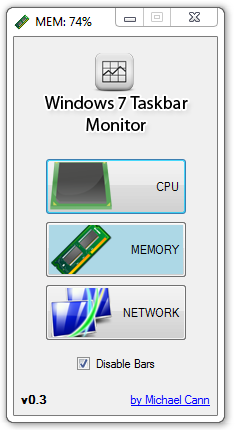
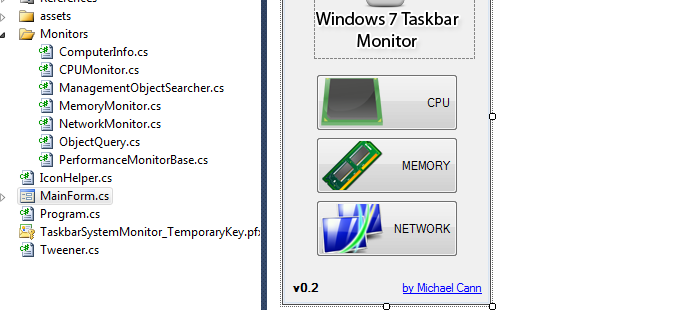
Windows Taskbar Monitor v0.4

screenshot_02

Over the years I have had a great many projects, most of which have been chronicled on this blog. The majority of them I leave alone once I have finished with them and never return to.

Windows Taskbar Monitor however is one of the rare tools that I actually still use one a daily basis. So when it stopped working the other day due to a patch in Windows 8 I decided to spare an hour to patch it up.

While I was there I decided to removed the "MEM", "CPU" and "NET" prefixes from the title bars as they weren't needed really and just took up more bar space.

I have pushed the source as usual to GitHub, you can grab the release here: https://github.com/mikecann/Windows7-Taskbar-Monitor/releases/tag/0.4

Wednesday, 4 April 2012

Introducing Printomi


I'm extremely proud to announce the launch of a project I have been working on for quite a while now.


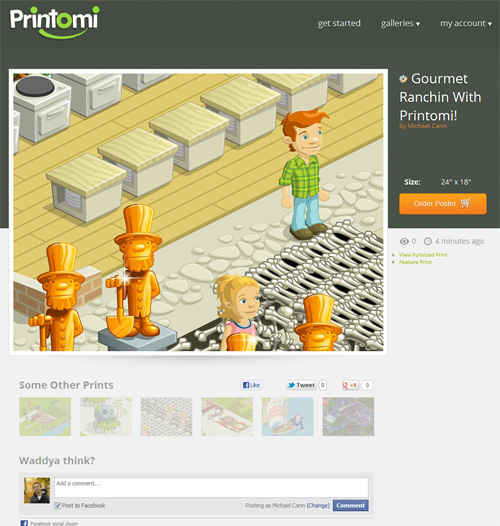
Printomi is a service for social games that allows players to take snapshots of their worlds and upload them to their own personal gallery. Players can like, comment share and order poster prints of their virtual creations.


The way it works is we provide the game owner with a tiny API that is used to interface with Printomi. The bulk of the Printomi client is downloaded at runtime from the Printomi servers. This is good for two reasons. Firstly by keeping down the size of the code that must be embedded into the game we can keep down the initial load time the player must sit through before they can play the game. Secondly we can upload changes and fixes to Printomi without requiring the game owner to recompile their code.


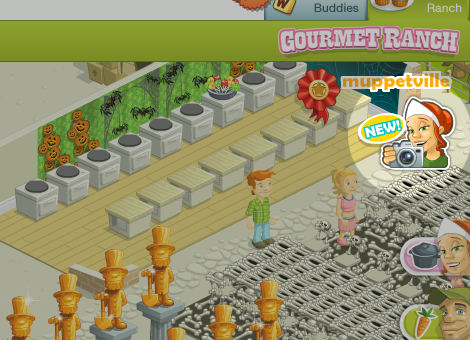
Once downloaded the printomi client is ready to be be used. In the case of Gourmet Ranch a themed button is shown to the player inviting them to click:


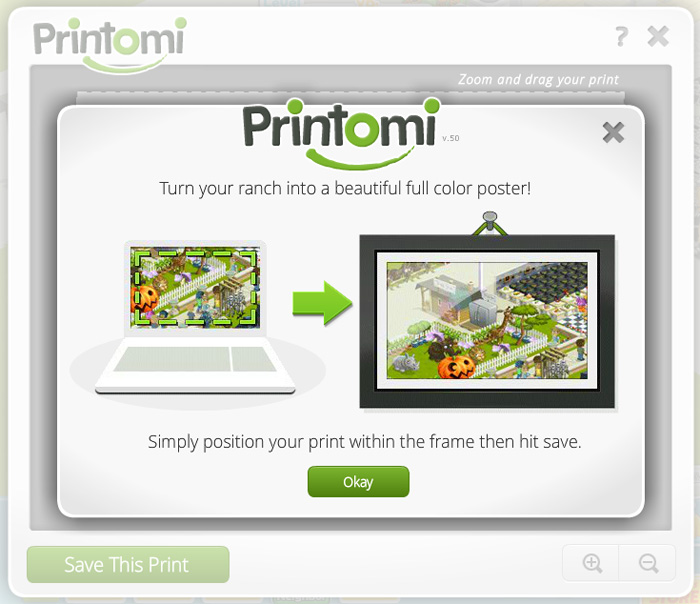
Once clicked (or activated by the JavaScript API) the main Printomi window opens:


The window has controls to zoom in and move the print about allowing the player to get the perfect angle of their world:


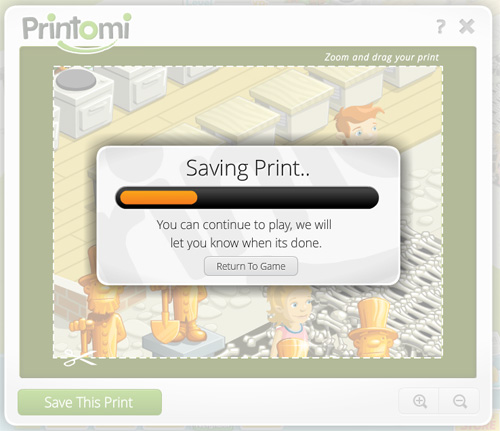
Once happy the player can then saves the print to the printomi servers. While the image is uploading the user can continue to play the game. Once the upload is complete the window is opened once more offering to show the player their print.


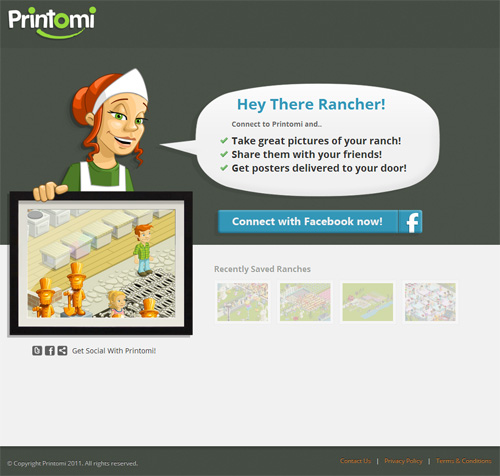
Printomi is tightly integrated with Facebook so that it's as easy as possible for new users to get started:


Once connected the new print is then available for viewing, sharing, liking, commenting, etc:


In addition the prints are organised into galleries so that users can browse the uploads of others:


If a user particularly likes one print then they can order it as a poster:


Currently we only offer posters to people living in the US however we plan on opening it up to other countries when we can.


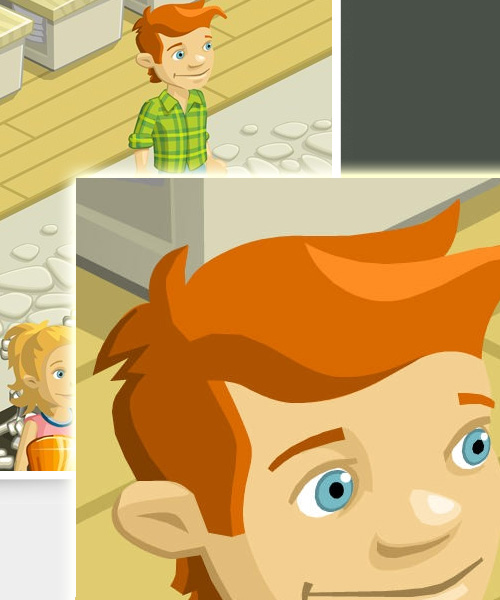
To print to such a large poster (24x18" @ 150DPI) and maintain the quality of the final product we must capture a large number of pixels. For example here is a comparison between what a user would see on printomi.com and what we store behind the scenes:


The technology that lets us capture these large images and store them in a compressed way (to conserve disk space and therefore cost) is quite complex and will have to wait for a later post.


Printomi is currently only available to a small subset of the Gourmet Ranch user base but we are performing a steady-rollout to everyone, so if you don't have access to the button in Gourmet Ranch just yet then don't worry it should be available for you soon!


Printomi is a culmination of many many hours of hard work, late nights and stress. But its been worth it! I've had a blast throughout the whole process and am proud of the result. I have also learnt a whole bunch in the process. I have had to work with so many technologies to pull this off, to name a few: AS3, C++, C#, ASP.Net, MySQL, IIS, AWS. I have particularly enjoyed the C# work having largely abandoned the language since my early work with it.


If you would like to support me or if you would like to keep up to date with the goings on with Printomi then you can like us on Facebook or follow us on Twitter :)


Saturday, 1 October 2011

Windows Taskbar Monitor v0.3


I have just pushed a few small changes to one of my projects, Windows Taskbar Monitor.

One of the users of the app noted that they find it rather annoying having the animated progress bars and asked whether it would be possible to add an option to disable it. I agreed that it could get a little distracting so I added the option to disable the bars.

While I was there I also added a couple of command line arguments to the app so that you could configure each instance from a shortcut.


The options are:

-bars [true/false]

This tells the app to startup with the bars enabled or not, the default is true.

-type [cpu/mem/net]

This tells which of the three monitors the app should start up with, cpu, memory or network.


One way to get all three to start with different monitors when windows startup would be to use the statup folder in windows.

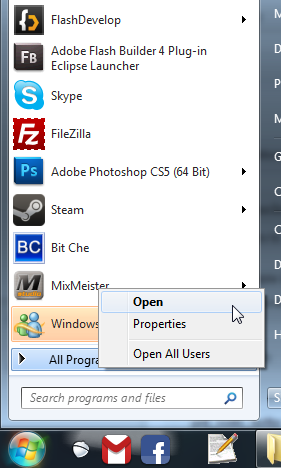
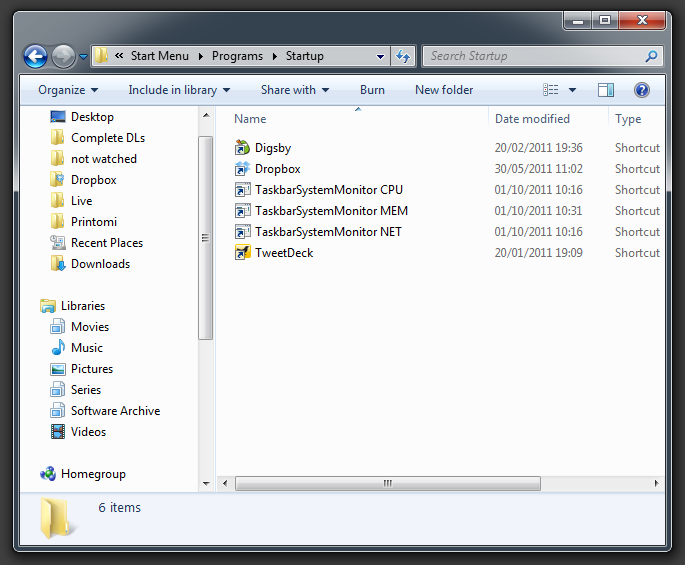
1) Click the windows start icon, then right click on "all programs" and click open:


2) Navigate to Programs > Startup then make three shortcuts to Windows Taskbar Monitor v0.3 you can rename the shortcuts if you like:


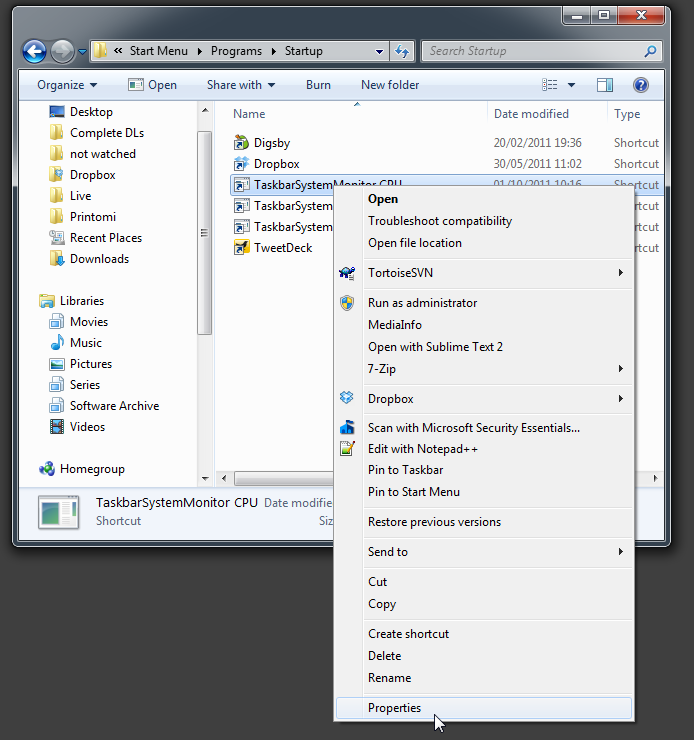
3) For each shortcut, right click and select properties:


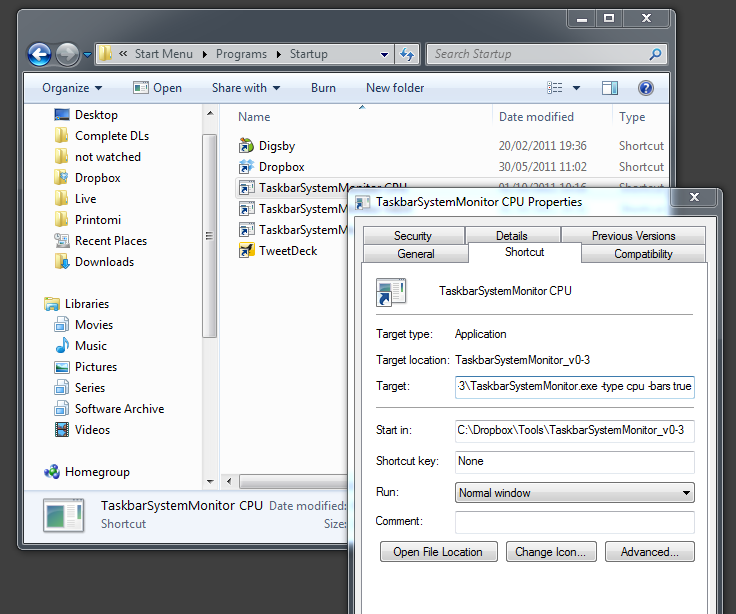
4) Now enter your command line arguments in the Target field after the final .exe:


Et voilĂ  when windows starts you should now have three different monitors opening!

I have pushed all the source code and the new binary files to my google code project: http://code.google.com/p/win7-taskbar-mon/

Enjoy!


Wednesday, 16 February 2011

Windows 7 Taskbar Performance Monitor v0.2


Been a long time since I have updated this little project of mine. Yep, just checked, its been almost a year since.

Oddly enough this is one of my projects I actually use on a daily basis at home and work. Im not sure why I haven't updated it since as there have been some rather gaping bugs in it which have been very annoying but apparently not annoying enough to encourage myself to fix them or to stop using it.

Anyways, I have finally decided to fix some of the most anoying issues namely:

  • It no longer crashes when the network is lost

  • It now correctly reports the amount of physical memory used


Theres no auto-updating feature built into the tool so if you are looking for the upgrade head over to the google code page to grab it: http://code.google.com/p/win7-taskbar-mon/downloads/list

Wow! Just noticed that over 2000 people have downloaded the first version, didn't think it was that popular!

Oh yes, I have also uploaded the latest source for this version: http://code.google.com/p/win7-taskbar-mon/source/checkout

Enjoy!

Saturday, 23 October 2010

Inputtie Development History - Networking

This is part two in my series of posts on the development history of Inputtie.

In this post I talk about the challenge of device discovery and networking in the Inputtie app.

Zero Configure Networking

I knew I wanted Inputtie to be as simple to get running as simply starting it up. For this to happen Inputtie would need to discover all other devices on the network also running Inputtie. So how to do this?


Well, as it happened I had been reading at the time about Apple's Bonjour which was designed to do just what I needed. It is a combination of a multi-cast and DNS lookup service that allows it to detect other Bonjour capable devices on the network. Sounds perfect.

So I got to work on implementing their Java API. After many trials and tribulations I eventually had it working.. kinda. It was detecting other devices sure, but every now and then it would sporadically disconnect from the network. I couldn't for the life of me work out why. I posted on forums and even tried to read the reams of source to see what was going on but alas to no avail.

After much deliberation I decided to look for another solution to the problem of Zero Conf. networking. Next up were a whole host of other attempts. I tried JmDNS which is was supposedly very similar to Bonjour. I also experimented with JGroups. I had limited success with all of them and in the end only really succeeded in wasting several months worth of development time.

The Solution

In the end the solution (and the one currently employed in Inputtie) was the simplest. After months of messing around with these libraries I had learnt quite abit about how they performed their magic. At the heart of it they either used multi-cast or broadcasting to announce a device on a network. Broadcasting can be thought of as a sort of sonar pulse. The broadcasting computer sends a message on a specific IP address then another device listens for the message and proceeds to open a Socket for a more private form of communication. From Wikipedia:
A broadcast address is a logical address at which all devices connected to a multiple-access communications network are enabled to receive datagrams. A message sent to a broadcast address is typically received by all network-attached hosts, rather than by a specific host.

I decided that if these libraries could use broadcasting for discovery then so could I and if I wrote it myself I could keep it simple. So I set to work coding an example in Java. In no time at all I had it running and surprisingly it worked! Sure it wasnt as robust as the established libraries, it didn't handle devices disconnecting from the network, different network subnets or IPv6 but it was simple and at least it worked!

Broadcasting in Adobe AIR

As I mentioned in a previous post Inputtie went through many re-writes during development from its original form in Java through C++, C Sharp and finally Adobe AIR. With the latest (it was still in beta when I started development) version of Adobe AIR 2.0 several new APIs were made available for use, one of them being new classes designed specifically for peer to peer (P2P) networking. With these new APIs I believed I should be able to implement network broadcasting much in the same was I was doing in Java. Unfortunately however it seemed that Adobe was restricting the use of broadcast to their new P2P service Cirrus.

There was however another crucial API released with AIR 2.0; the NativeProcess API. With this a developer is able to easily execute and communicate with a program written in another language. What this meant for Inputtie was that I could write the user interface in AIR and then use NativeProcess to call Java code that would perform actions not available in AIR, such as Broadcasting. (incidentally it also is a great way to do multi-threading in Air ;))

So the current solution in Inputtie is to use NativeProcess from AIR to communicate with a small headless (no user-interface) Java process that does the broadcasting and listening for broadcasts. Once the Java process detects an incoming broadcast it passes the information back to AIR.

EDIT: If anyone is interested in seeing the source to my previous (failed) attempt just drop me a comment or an email and I would be happy to share.

Sunday, 15 August 2010

Shader Based 2D Shadowing


Those who know me know I used to do quite abit of development in c# using Microsoft's XNA platform.

Well I like to check back in every now and then with some of the big players in the community to see what's going on.

One of those players is Catalin Zima, who is famous for producing many great shader and effect samples.

One of Catalin's reccent project particularly caught my eye however as I had tried to tackle the same problem several years ago when I was in my final year of university. That is, Dynamic 2D Shadows Calculated on the GPU (http://mikecann.co.uk/university-projects/shadowshader-in-rendermonkey/)

Catalin's approach to the problem is far more elegant that my brute force iterative approach. He uses a clever technique of distorting the desired casting image about the light in such a way as not to require iterative pixel lookups.

If you are interested in the more details in the technique I encourage you to check it out over on Catalin's blog: http://www.catalinzima.com/2010/07/my-technique-for-the-shader-based-dynamic-2d-shadows/

Sunday, 14 March 2010

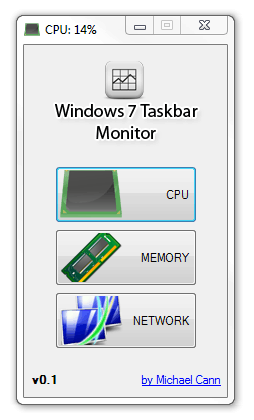
Windows 7 Taskbar Monitor

Well this will learn me!

A while back, I had an idea for a very simple application that would sit in your taskbar and give you at-a-glance performance info about your system, similar to iStat Pro for OSX. This weekend I finally had time to clean up the code up for release.

The problem is that while looking for a couple of images for the app I happened to stumble across Taskbar Meters, which is pretty much the exact same idea I had. Looks like he has made a better job out of it that me too :P

Ah well, I have decided to release my version of the app nonetheless:


You can open the app multiple times and set each one to monitor a different value:


I have also decided to post the source up on google code: http://code.google.com/p/win7-taskbar-mon/

Anyways you can grab version 0.1 here: http://win7-taskbar-mon.googlecode.com/files/Windows7_Taskbar_Monitor_v0.1.zip

Wednesday, 10 February 2010

On the Bleeding Edge

Well it thought it was about time I did some posting about my personal project im working on at the moment as I havent spoken about my coding for a while.

For a while now (alot longer than I had hoped for) I have been working on a project that falls outside the realms of my usual kind of games-related projects. Im not ready do describe exactly what it is yet but im excited about it.

For months I have been struggling with the techinal challenges the project has entailed and I have dabbled with many new and highly diverse technologies including JavaFX (Java), Qt (C++) and Mono (C#).  I have been looking for a cross-platform technology that will get the job done that I need and doing it in an elegant manner.

I thought I had found it with a combination of JavaFX and straight Java using the PureMVC framework. I however was plagued with problems throughout with Bonjour, jGroups, JmDNS, JNI and JNA.

So after months of work, hardship and struggles I read a very interesting article on the up-and-coming Adobe AIR 2.0  that was opened for beta in December. With 2.0 Adobe are bringing NativeProcess  to Air. What this means is that you can you can execute native code (.dlls, .so, .jar etc) from Air. To me this was bloody brilliant as I had been playing with Air reccently and my day-job heavily involves Flex and I simply love the power and beauty of Flex.

So what this meant to me was that I could write the bulk of my project including its interface in my much preferred Adobe Flex (Air) and then use Native Process to communicate with a small kernel of Java that would do all the dirty work that Air itself cant do.

So after a little playing with Flerry for Air->Java bridge I started to think about the structure of the code and the framework I would use. For my initial few runs at this project I had been using the Java version of PureMVC. I really like some aspects of PureMVC but I think its can be so overly cumbersome in some circumstances (ill write another post on this in the future I think). So instead I looked at the alternatives.

I have been using Mate alot recently at work and on my own mini-project the Audio Book Organiser. However as this project is partly for my own learning and personal growth I decided to look at what else there was out there. From the videos by Jessie Warden I had heard about Robot Legs. Apparently this framework has been around for a while, but it was the first I had heard of it. Taking at look at it I immediately became very excited as it looks like it offers all the things that make PureMVC great but without the extra coding-baggage that goes with it.

To add to my interest it appears another very interesting, very new action-script technology has been introduced into Robot Legs called Signals by Robert Penner. Signals is an alternative to the standard events dispatching method found throughout flash (more on this in another post).

So why have I called this post "the bleeding edge?". Well Adobe Air 2.0 is still in beta and has only been for a month or so. Its so new that some parts still havent been documented atall and the only way to find out how they work is to post a msg to the devs on the forums. Signals is also new and its integration into Robot Legs is very new indeed (last coupple of weeks). So at the moment I feel as if im at the forefront of some very new, very exciting technology, a stark contrast to my fiddlings with the ancient Java.

I realise this post is very text and tech-heavy but I needed to post about it before I forgot all the pain I have gone through with this project to get where I am at the moment. Future posts ill be delving a little deeper into some of my experiments with these new technologies ;)

Monday, 11 May 2009

Flash Develop Plugin: Go To Definition

Go To Definition
I love the Ctrl & click feature in Eclipse/Netbeans and the Go To Definition feature in Visual Studio and have decided to implement them in Flash develop. After an evening or so of trying to write this myself I come accross the "ASComplete.DeclarationLookup()" method. To my great astonishment, this does exactly what I want. So thankyou to Philippe or whoever wrote this method and did all the hardwork of the plugin for me ;)

Screenshot


DLL
http://www.mikecann.co.uk/Files/GoToDefinition.dll

Source
http://www.mikecann.co.uk/Files/GoToDefinition_source.zip

Post
http://www.flashdevelop.org/community/viewtopic.php?f=4&t=4722

EDIT:
It appears that the same functionality is built as standard into FD with the use of the F4 key. Oh well, you can still use this as a shortcut ;)

Monday, 4 May 2009

Highlight Selected Plugin, updated by David Hancock

This sort of things brings a big smile to my face; I got an excellent email yesterday from a chap named Dave Hancock asking my permission to post an update he had made to my Highlight Selected plugin.

Its an excellent upgrade and brings some extra features that were lacking in my very basic version.

Copy / Paste of his update:

Liked the plugin so much I decided to add a few features! Posting here with Mike's permission.

Screenshot


Updates
Added 4 plugin setting options:

Highlight Color (Choose a color for the highlight)
Highlight Whole Words (Choose whether to highlight whole words only or include partial text)
Match Case (Choose whether to match the case of the selection or not)
Add Line Marker (Display a line marker next to highlighted text)

No longer highlights white-space characters

Installation
+ Open FlashDevelop, Click Tools -> Application Files
+ Copy the DLL to the "Plugins" directory
+ Restart FlashDevelop

DLL
http://gonegothic.com/files/flashdevelo ... ection.dll

Source
http://gonegothic.com/files/flashdevelo ... ection.zip

Thursday, 30 April 2009

Proof of Concept: TwittBot

Well for the last few evenings I have been working on this little proof of concept. One of my work colleague Ade (@6t8) came up with the idea "someone should make a game that you can play over twitter". Well after abit of excitement and talk I decided to have a go at coding this idea. Once I had started I realised that it could be possible to do alot more with this, so I decided to make the project a little more generic and turn it into a pluggable bot for automating twitter.

After a few evenings work however I decided that this project was going to take up a bit too much of my time, especially when I had so much other work to do. So I have decided to release what I have done and let other take it and develop it if they wish.

You login using a twitter account:

1

Wednesday, 11 March 2009

XNA Archive

I just realised some of my old XNAGPUParticles project videos have gone walkies. So I have reposted them on youtube. These are my old projects from my final year of uni, binary and source code can be found in the relevant post for each video.

http://www.mikecann.co.uk/?p=163
httpvh://www.youtube.com/watch?v=vxrg1YavBIg

http://www.mikecann.co.uk/?p=169

httpvh://www.youtube.com/watch?v=3wdIiCCAb9U

I have another reason for these old re-posts, something a little more flash orientated.. Stay tuned for more info ;)

Sunday, 3 February 2008

PlaceEd 3

Recently I have been working on some small tools for the lads at work to aid them in designing mobile phone games.


One project I have been working on for a while (in my spare time at work and in the evenings at home) is a new version of PlaceEd. PlaceEd is a small app used by people at work who need to design levels with objects and paths in them.


The reason for making this new version was because the original was starting to show its age and after several modifications to customise it to certain projects it has become unreliable. A second version (PlaceEd2) was half coded by one of the other employees at rockpool though they ran out of time and didn’t complete it.


So that’s where I come in, and I wrote from scratch a new app and called it PlaceEd 3 (even though there wasn’t really a fully released version of PlaceEd 2).

Wednesday, 30 January 2008

XNALiquids 03

Well i was just thinking in work today that it may be possible to detect the bounds of the the particle "clusters" and then line drawing the boundry and then you wouldnt notice the compression that the particles tend to suffer from.


When i got home i tested out my theroy and the results can be seen below. Its pretty obvious that its not perfect but as i say it was just me messing.


Oh BTW grant kot has been working on his polluted planet some more, and its starting to look quite impressive now its over in XNA: link1, link2


Thursday, 17 January 2008

XNALiquids02

Okay well i have been playing around with my particles AGAIN :P

I started this time from some work done by the CUDA team over at NVidia. As im running windows Vista i couldnt get CUDA to work so i read through the source and adapted it to my needs.

As you can see from the video below its better than my last attempt but still not perfect, it also still runs on  the CPU on a single core and has had no optomisations applied to it.

Hopefully tho i can build on this to make it better.

Saturday, 5 January 2008

XNALiquids 01

Well after seeing what Polluted Planet did with large numbers of interactive particles in java, it got me interested.

So i have decided to have a go at implementing it myself in XNA.

So here it is, my first attempt at it. Currently the algorithm is very rough as you can see from the video there are still some problems that cause the particle to behave a little... umm.. erratic ;)

Hopefully with abit more time and effort ill get it sorted. At the moment there are 5000 interacting particle on one CPU, hopefully i will beable to push that figue up soon and take advantage of my quad-core system :)

Wednesday, 5 December 2007

Project Technology (Deformable Terrains)

Well i got asked a question in a comment on how the terrains work in the LieroXNA project so I thought i would do a quick post on this rather than reply in the comments.


The way the terrains work has changed a few times over the course of development of the project for various reasons mostly related to the incompatabilities of the 360 and my previous methods. I wont go into those previous methods here but if anyone reading this has any questions dont hesitate to ask in a comment or email me. I would also like to say this may not be the most efficient method as I was only getting the terrains up as a proof of concept first then was planning on refining later.


Sunday, 11 November 2007

Project Update

Well its been a while since i have posted an update regarding the LieroXNA project. I havent been slacking. 


I have been spending the majority of my time getting it to run on the 360. I ran into many problems, the majority of which were due to the different ways render targets work on the 360 and the fact that you cant use 128bit floating point textures (Vector4 textures).


Ill be going into more depth on the problems i faced on the 360 in a different post. But what i can say is that it works almost perfectly on the 360 now and im very happy with it.


For now you can see a new video of the engine with some fancy bloom effects added :)


Sunday, 30 September 2007

LieroXNA - Improvements and Additions

Been a while since I have posted about LieroXNA but I havent been doing nothing. Changes and things:

+ Added a destroyed layer to the game which is just the initial map but darker.
+ Added a shadow to the foreground to give it a more 3D appearence.
+ Added an indestructable layer, so that maps can have abit of structure even after a long battle.
+ Added the ability to zoom in and out. This was a big one and took most of last weekend to sort out.
+ Added player spawning.
+ Added the ability to control the player with the 360 controller.
+ Started to add other gameplay features such as player jumps, crosshair, weapon switching things and others.

Anyways you can see all these new features in action in the video below. Again, you can download a higher quality one if you wish: [download#1]


<

Sunday, 16 September 2007

LieroXNA - Weapons and Forces

I have been working hard on LieroXNA this weekend and have managed to get quite abit of what I wanted done.

Firstly I worked on setting up a framework for weapons that allows them to be described by an external xml. This should reduce the effort involved in creating new weapons in the future. Taking a quick look at the XML that describes the rocket weapon you can see its straight forward but also pretty powerful:


<?xml version="1.0" encoding="utf-8" ?>

<weapon name="Rocket" type="projectile">
    <properties>
        <texture>rocket</texture>
        <trail>smoke</trail>
    </properties>

    <events>
        <onTerrainCollide>
            <spawn type="explosion" size="64"  where="this" velocity="this" />
            <spawn type="shrapnel" quantity="10"  where="this" velocity="this" />
            <die/>
        </onTerrainCollide>
    </events>
</weapon>


In addition I have been working on adding forces into the game. It took abit of tweaking but now explosions have a force which repels particles around it, you can see this in action in the video below. I have also added a "vortex" special weapon that sucks particles towards it which then swirl around until the vortex implodes expelling all the particles.

The size of the world has now been expanded and a simple camera has been added. Previously the intention was the world was to be split into multiple tiles of 1024x768 textures but i have now decided against that due to the level of complexity involved and gone for a system that uses one large texture (2048x2048 currently) instead. I have also changed the texture so its a little less "programmer art" as I was getting some stick for that :P

There is still alot of work to be done but im happy with the way it looks at the moment. You will have to excuse the video quality below, flash isnt the best compression for alot of fast moving small particles.

If you want to see a larger less compressed video (35meg) you can download it HERE.