Over the years I have had a great many projects, most of which have been chronicled on this blog. The majority of them I leave alone once I have finished with them and never return to.
Windows Taskbar Monitor however is one of the rare tools that I actually still use one a daily basis. So when it stopped working the other day due to a patch in Windows 8 I decided to spare an hour to patch it up.
While I was there I decided to removed the "MEM", "CPU" and "NET" prefixes from the title bars as they weren't needed really and just took up more bar space.
I have found a little more time this evening to fix some bugs and make some improvements to my Chrome extension Recursive. The changes are as follows:
----- v.1.1 ------ - Now only displays recursive icon on tabs with http:// and https:// - Full screen now works (uncommented that line of code, doh!) - Pause and reseting a recurse now works correctly - Renamed the title page of the app - Some Performance improvments - There is now an option in the settings to define a custom file filter - There is now a setting to disable removing duplicate files
One of the main new additions is the ability to add a custom filter in the settings which recursive uses when parsing a file:
If any are found they are then displayed in the files dialog:
As I say, just a quick update this evening. I plan on writing some more in-depth blog posts this week explaining some of the nuts and bolts of Recursive.
Been a long time since I have updated this little project of mine. Yep, just checked, its been almost a year since.
Oddly enough this is one of my projects I actually use on a daily basis at home and work. Im not sure why I haven't updated it since as there have been some rather gaping bugs in it which have been very annoying but apparently not annoying enough to encourage myself to fix them or to stop using it.
Anyways, I have finally decided to fix some of the most anoying issues namely:
It no longer crashes when the network is lost
It now correctly reports the amount of physical memory used
For the last year or so my major personal-project has been under wraps but after a few intense weeks its finally time to talk about it!
First before I explain exactly what Inputtie is I will talk about why I started this project and the problem I was trying to solve.
(If you aren't interested in all the background fluff and just want to find out what Inputtie is, head over to inputtie.com)
The Problem
About a year ago I was doing a lot of work at home that involved working both on my desktop PC and my MacbookPro. Often I would find myself using my mouse and keyboard on my PC then having to lean accross to use the trackpad and keyboard on my MBP. Now, I hate trackpads so what I started doing was unplugging my keyboard and mouse from my desktop then plugging back into my MBP when I wanted to use it.
This situation was obviously less than ideal, so I started looking around for other solutions. I had heard of hardware you can buy that involves flipping a switch when you want to change which device you want your input to go to. I considered this but thought there must be a more elegant software solution. I had an idea in my head where I wanted you to simply move my mouse pointer off my desktop monitor and it would then magically appear on the laptop screen.
It was at this point I found out about Synergy. I took a good look at it but for the life of me could not get it to work no matter how hard I tried. It also involved lots of fiddley messing around with IP addresses / hostnames and command line parameters (it has improved in a year, but more on that later). So I thought to myself surely there is a better way of doing this, surely its not a tough technical problem to solve!?
The Solution
I had originally intended to talk about the myriad of attempts, blind alleys, different languages and general headaches I endured to get to this point however its a very lengthy topic. So instead in this post im just going to talk about the final solution talk about the previous attempts in later posts.
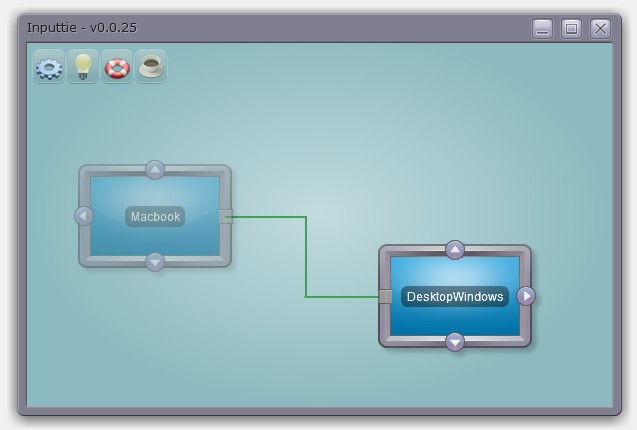
So without any further ado I present a screenshot of Inputtie, so you can get an idea of whats going on:
It's an Adobe AIR 2 application so it means it will look and work the same across all supported operating systems (Mac, Windows, Linux). AIR also makes it super easy to install and update so for most users it should be a very simple matter to get it up and running.
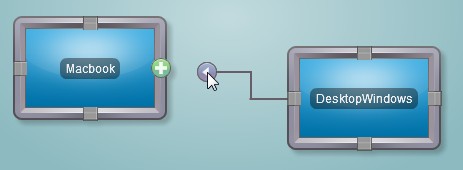
The way it works is simple. When opened it automatically detects other devices on your network that have Inputtie running. You then make a connection between your two devices by simply dragging and dropping an arrow from one device to another:
Do the same on the other device and your computers are now connected, its that simple! Now when you move your mouse across to the side of the screen (side dependant on which arrow you picked) it will magically appear on the screen of the other device, splendid!
Now over there you can use your keyboard and mouse as normal and the input will be transferred over.
You can even also copy and paste text from one device to the other. This is great when you just want to blast a URL or some other bit of text to the laptop or back again without having to send emails or use IM or make a text file and send it over a network or anything else.
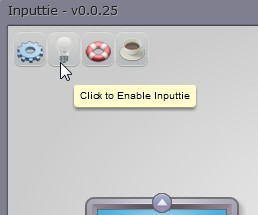
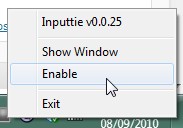
If you want to fire up a game or something that inputtie may interfere with you can simply and easily toggle it to disabled:
Website
Early into the project I teamed up with my partner in crime and jack-of-all-trades Oliver Pitceathly. The original idea was to release this as a commercial product so we wanted to have a nice high-quality website as a landing page for potential customers. In the latter stages of the product we decided to drop the commercial aspect and make it donation-ware instead.
Despite my constant badgering and mind-changing Oli has done a fantastic job on the website, it looks simply great!
He even found time to do an awsome video that shows off the best features of Inputtie:
Planned Extensions
There are many potential extensions that you could imagine would be really handy.
Imagine being able to tare a tab from your desktop browser then drag it over to your laptop and having it then appear there.
Even better how about simply dragging a file or folder over then having it transfer quickly, be pausable, restartable, and toggle the bandwith it uses. All possible and planned extensions in Inputtie.
Another idea is using the multi-touch track pad on the macbook to interact in a multi-touch fashion with windows 7 on your desktop.
Beta
"So where can I get my hands on it?" you cry. Well we haven't actually release it for download just yet, there are some niggley bugs and things to work out with it still. If you are interested in testing it out tho sign up for the beta over at inputtie.com and ill shoot you a mail when its ready to go!
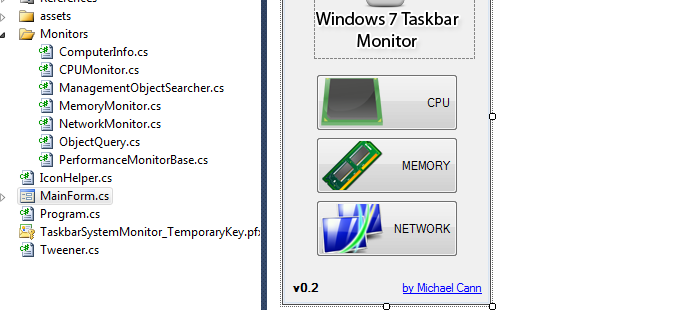
A while back, I had an idea for a very simple application that would sit in your taskbar and give you at-a-glance performance info about your system, similar to iStat Pro for OSX. This weekend I finally had time to clean up the code up for release.
The problem is that while looking for a couple of images for the app I happened to stumble across Taskbar Meters, which is pretty much the exact same idea I had. Looks like he has made a better job out of it that me too :P
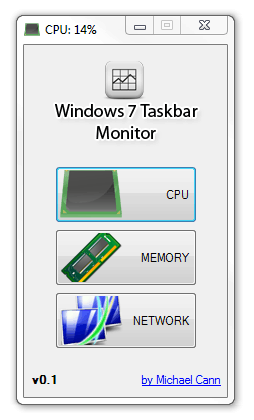
Ah well, I have decided to release my version of the app nonetheless:
You can open the app multiple times and set each one to monitor a different value:
This is fantastic news as I have been interested in doing an iPhone app for some time and have even gone as far as reading the docs and purchasing the Developer program.The stumbling block was the learning curve with Objecive-C. Now tho it seems I should be able to get away with just learning a new nuances with Flash->iPhone.
What does this mean? Well some of my previous games BlastWave, IcySlicy, CodeDrop, BlastOut would all work well on the iPhone, however I detest simply re-hashing old ideas so likely ill be making a very simple flash game to start off with that will take advantage of all the new inputs the iPhone and Flash10.1 will allow!