Made a few small stability changes with Inputtie tonight, thought I would share.
Release notes are as follows:
Inputtie Version 0.1.6 (25/10/10)
+ Inputtie now checks for updates every 12 hours
+ Mouse can now correctly reach all the way to the edge of the screen
+ Mouse now remains in the last position it was before the connection closes
Showing posts with label Inputtie. Show all posts
Showing posts with label Inputtie. Show all posts
Monday, 25 October 2010

Saturday, 23 October 2010
Inputtie Development History - Networking
This is part two in my series of posts on the development history of Inputtie.
In this post I talk about the challenge of device discovery and networking in the Inputtie app.
 Zero Configure Networking
I knew I wanted Inputtie to be as simple to get running as simply starting it up. For this to happen Inputtie would need to discover all other devices on the network also running Inputtie. So how to do this?
Well, as it happened I had been reading at the time about Apple's Bonjour which was designed to do just what I needed. It is a combination of a multi-cast and DNS lookup service that allows it to detect other Bonjour capable devices on the network. Sounds perfect.
So I got to work on implementing their Java API. After many trials and tribulations I eventually had it working.. kinda. It was detecting other devices sure, but every now and then it would sporadically disconnect from the network. I couldn't for the life of me work out why. I posted on forums and even tried to read the reams of source to see what was going on but alas to no avail.
After much deliberation I decided to look for another solution to the problem of Zero Conf. networking. Next up were a whole host of other attempts. I tried JmDNS which is was supposedly very similar to Bonjour. I also experimented with JGroups. I had limited success with all of them and in the end only really succeeded in wasting several months worth of development time.
The Solution
In the end the solution (and the one currently employed in Inputtie) was the simplest. After months of messing around with these libraries I had learnt quite abit about how they performed their magic. At the heart of it they either used multi-cast or broadcasting to announce a device on a network. Broadcasting can be thought of as a sort of sonar pulse. The broadcasting computer sends a message on a specific IP address then another device listens for the message and proceeds to open a Socket for a more private form of communication. From Wikipedia:
I decided that if these libraries could use broadcasting for discovery then so could I and if I wrote it myself I could keep it simple. So I set to work coding an example in Java. In no time at all I had it running and surprisingly it worked! Sure it wasnt as robust as the established libraries, it didn't handle devices disconnecting from the network, different network subnets or IPv6 but it was simple and at least it worked!
Broadcasting in Adobe AIR
As I mentioned in a previous post Inputtie went through many re-writes during development from its original form in Java through C++, C Sharp and finally Adobe AIR. With the latest (it was still in beta when I started development) version of Adobe AIR 2.0 several new APIs were made available for use, one of them being new classes designed specifically for peer to peer (P2P) networking. With these new APIs I believed I should be able to implement network broadcasting much in the same was I was doing in Java. Unfortunately however it seemed that Adobe was restricting the use of broadcast to their new P2P service Cirrus.
There was however another crucial API released with AIR 2.0; the NativeProcess API. With this a developer is able to easily execute and communicate with a program written in another language. What this meant for Inputtie was that I could write the user interface in AIR and then use NativeProcess to call Java code that would perform actions not available in AIR, such as Broadcasting. (incidentally it also is a great way to do multi-threading in Air ;))
So the current solution in Inputtie is to use NativeProcess from AIR to communicate with a small headless (no user-interface) Java process that does the broadcasting and listening for broadcasts. Once the Java process detects an incoming broadcast it passes the information back to AIR.
EDIT: If anyone is interested in seeing the source to my previous (failed) attempt just drop me a comment or an email and I would be happy to share.
In this post I talk about the challenge of device discovery and networking in the Inputtie app.
 Zero Configure Networking
I knew I wanted Inputtie to be as simple to get running as simply starting it up. For this to happen Inputtie would need to discover all other devices on the network also running Inputtie. So how to do this?
Well, as it happened I had been reading at the time about Apple's Bonjour which was designed to do just what I needed. It is a combination of a multi-cast and DNS lookup service that allows it to detect other Bonjour capable devices on the network. Sounds perfect.
So I got to work on implementing their Java API. After many trials and tribulations I eventually had it working.. kinda. It was detecting other devices sure, but every now and then it would sporadically disconnect from the network. I couldn't for the life of me work out why. I posted on forums and even tried to read the reams of source to see what was going on but alas to no avail.
After much deliberation I decided to look for another solution to the problem of Zero Conf. networking. Next up were a whole host of other attempts. I tried JmDNS which is was supposedly very similar to Bonjour. I also experimented with JGroups. I had limited success with all of them and in the end only really succeeded in wasting several months worth of development time.
The Solution
In the end the solution (and the one currently employed in Inputtie) was the simplest. After months of messing around with these libraries I had learnt quite abit about how they performed their magic. At the heart of it they either used multi-cast or broadcasting to announce a device on a network. Broadcasting can be thought of as a sort of sonar pulse. The broadcasting computer sends a message on a specific IP address then another device listens for the message and proceeds to open a Socket for a more private form of communication. From Wikipedia:
A broadcast address is a logical address at which all devices connected to a multiple-access communications network are enabled to receive datagrams. A message sent to a broadcast address is typically received by all network-attached hosts, rather than by a specific host.
I decided that if these libraries could use broadcasting for discovery then so could I and if I wrote it myself I could keep it simple. So I set to work coding an example in Java. In no time at all I had it running and surprisingly it worked! Sure it wasnt as robust as the established libraries, it didn't handle devices disconnecting from the network, different network subnets or IPv6 but it was simple and at least it worked!
Broadcasting in Adobe AIR
As I mentioned in a previous post Inputtie went through many re-writes during development from its original form in Java through C++, C Sharp and finally Adobe AIR. With the latest (it was still in beta when I started development) version of Adobe AIR 2.0 several new APIs were made available for use, one of them being new classes designed specifically for peer to peer (P2P) networking. With these new APIs I believed I should be able to implement network broadcasting much in the same was I was doing in Java. Unfortunately however it seemed that Adobe was restricting the use of broadcast to their new P2P service Cirrus.
There was however another crucial API released with AIR 2.0; the NativeProcess API. With this a developer is able to easily execute and communicate with a program written in another language. What this meant for Inputtie was that I could write the user interface in AIR and then use NativeProcess to call Java code that would perform actions not available in AIR, such as Broadcasting. (incidentally it also is a great way to do multi-threading in Air ;))
So the current solution in Inputtie is to use NativeProcess from AIR to communicate with a small headless (no user-interface) Java process that does the broadcasting and listening for broadcasts. Once the Java process detects an incoming broadcast it passes the information back to AIR.
EDIT: If anyone is interested in seeing the source to my previous (failed) attempt just drop me a comment or an email and I would be happy to share.
Sunday, 17 October 2010
Inputtie - Version 0.1.5

Just a few small changes in this update:
From the release notes:
Inputtie Version 0.1.5 (17/10/10)
+ Middle mouse input is now caught and transferred between devices
+ More errors are caught in the client
+ Keys are now depressed when a connection is cut, no more lingering Shift, yey!
The new version should automatically download, but if you don't yet have it go grab it on the download page -> http://www.inputtie.com/download/
Saturday, 9 October 2010
Inputtie History - The Beginning
I promised in a previous post to post to talk about the Inputtie development process a little, the various challenges encountered and how I attempted to solve them.
In this post im going to talk about the very beginning of the project and what I knew I wanted to have in the final version. Subsequent posts will elaborate on the various technical hurdles and my attempts to solve them.
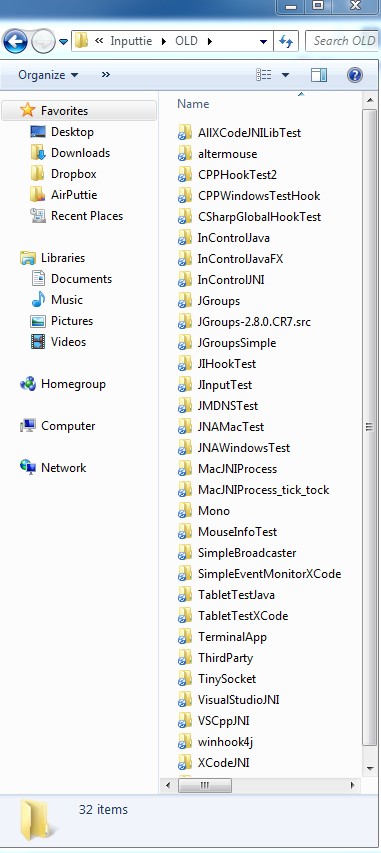
[caption id="attachment_1372" align="alignright" width="229" caption="Various Inputtie Attempts"] [/caption]
I have already talked about the problem in my previous post but ill recap.
About a year ago I was doing a lot of work at home that involved working both on my desktop PC and my MacbookPro. Often I would find myself using my mouse and keyboard on my PC then having to lean accross to use the trackpad and keyboard on my MBP. Now, I hate trackpads so what I started doing was unplugging my keyboard and mouse from my desktop then plugging back into my MBP when I wanted to use it.
This situation was obviously less than ideal, so I started looking around for other solutions. I had heard of hardware you can buy that involves flipping a switch when you want to change which device you want your input to go to. I considered this but thought there must be a more elegant software solution. I had an idea in my head where I wanted you to simply move my mouse pointer off my desktop monitor and it would then magically appear on the laptop screen.
It was at this point I found out about Synergy. I took a good look at it but for the life of me could not get it to work no matter how hard I tried. It also involved lots of fiddley messing around with IP addresses / hostnames and command line parameters (it has improved in a year, but more on that later). So I thought to myself surely there is a better way of doing this, surely its not a tough technical problem to solve!?
So starting back in October 2009 I decided to undertake the problem, it shouldn't take more than a few evenings to put something together surely?
First I tried to identify the core features I knew I wanted the tool to have:
With the core features roughly sketched out I could now start thinking about the various technologies I would need to implement them.
My initial thoughts were that Java should be the ideal language to do this in. I could capture the input from one device (somehow) then I could send it to another device and use the Robot class in Java to simulate the input. Because its Java it will work across all operating systems seamlessly so people using it on windows / mac / linux would all get exactly the same experience and I wouldn't have to lift an extra coding finger as Java would take care of all the nasties for me.
It also helped that I was very familiar with Java having worked on severl personal and professional projects in the language. From my Chain Reaction project I knew it was possible to create relatively nice user interfaces probably it would take some work to make them look as good as I wanted but surely it wouldn't be too hard.
So with some confidence I decided to get cracking on development.
Edit: I am breaking this up into several posts as this was getting to be rather large and difficult to read ;) So check out the posts in the coming weeks for more.
In this post im going to talk about the very beginning of the project and what I knew I wanted to have in the final version. Subsequent posts will elaborate on the various technical hurdles and my attempts to solve them.
The Problem
[caption id="attachment_1372" align="alignright" width="229" caption="Various Inputtie Attempts"]
 [/caption]
I have already talked about the problem in my previous post but ill recap.
About a year ago I was doing a lot of work at home that involved working both on my desktop PC and my MacbookPro. Often I would find myself using my mouse and keyboard on my PC then having to lean accross to use the trackpad and keyboard on my MBP. Now, I hate trackpads so what I started doing was unplugging my keyboard and mouse from my desktop then plugging back into my MBP when I wanted to use it.
This situation was obviously less than ideal, so I started looking around for other solutions. I had heard of hardware you can buy that involves flipping a switch when you want to change which device you want your input to go to. I considered this but thought there must be a more elegant software solution. I had an idea in my head where I wanted you to simply move my mouse pointer off my desktop monitor and it would then magically appear on the laptop screen.
It was at this point I found out about Synergy. I took a good look at it but for the life of me could not get it to work no matter how hard I tried. It also involved lots of fiddley messing around with IP addresses / hostnames and command line parameters (it has improved in a year, but more on that later). So I thought to myself surely there is a better way of doing this, surely its not a tough technical problem to solve!?
Technical Hurdles
So starting back in October 2009 I decided to undertake the problem, it shouldn't take more than a few evenings to put something together surely?
First I tried to identify the core features I knew I wanted the tool to have:
- Work on the three major operating systems, Windows, OSX, Linux.
- Be appealing and simple to use without any fiddly configuration file editing.
- Without any effort on the part of the user detect other available devices on the network.
- Capture low-level input, mouse & keyboard.
- Transfer the input to the other device and have it applied.
With the core features roughly sketched out I could now start thinking about the various technologies I would need to implement them.
My initial thoughts were that Java should be the ideal language to do this in. I could capture the input from one device (somehow) then I could send it to another device and use the Robot class in Java to simulate the input. Because its Java it will work across all operating systems seamlessly so people using it on windows / mac / linux would all get exactly the same experience and I wouldn't have to lift an extra coding finger as Java would take care of all the nasties for me.
It also helped that I was very familiar with Java having worked on severl personal and professional projects in the language. From my Chain Reaction project I knew it was possible to create relatively nice user interfaces probably it would take some work to make them look as good as I wanted but surely it wouldn't be too hard.
So with some confidence I decided to get cracking on development.
Edit: I am breaking this up into several posts as this was getting to be rather large and difficult to read ;) So check out the posts in the coming weeks for more.
Wednesday, 22 September 2010
Inputtie - Beta Release!
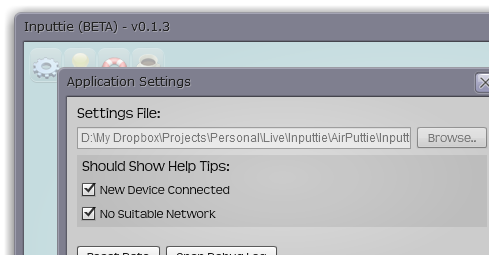
Woooo Hooo! Finally after almost a years worth of toiling we have finally released the beta version of Inputtie.
Now I have only performed a limited amount of testing so im sure there are going to be bugs-a-plenty. If you find something I would love to hear about it. We dont currently have a dedicated email address you can use for this so just use the contact box on the side of the inputtie page to get in touch.
Anyways, here are the release notes for this version:
Inputtie Version 0.1.3 (22/03/10)
+ Beta Release!
+ Fixed an issue that was causing the mouse pointer to not quite reach the edge of the screen
+ Fixed it so that you can now choose not to show the "new device" help tip.
+ New Icons, yey!
Grab the download over on the download page now!
Oh BTW we decided to go with the "e" in a bordered square for our app icon:


Tuesday, 21 September 2010
Inputtie - Beta Drawing Near!
Final testing is under way here at mission control for the Inputtie Beta.

1 Keyboard, 1 Mouse, 1 PC, 2 Laptops, 1 Netbook, 4 Operating Systems.
All systems are go! Almost ready for takeoff!
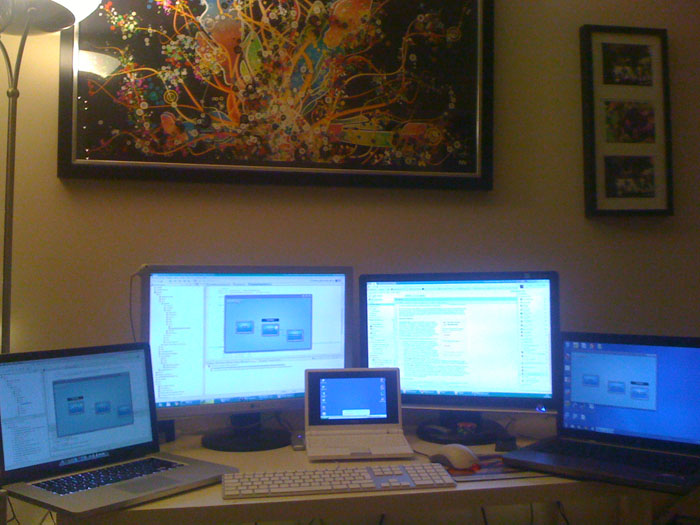
1 Keyboard, 1 Mouse, 1 PC, 2 Laptops, 1 Netbook, 4 Operating Systems.
All systems are go! Almost ready for takeoff!
Monday, 20 September 2010
Inputtie - App Icons
With the beta for Inputtie drawing very near Oli and I are adding some final touches to the build and doing those "things we meant to do for ages". One of those things being the app icon. This is the icon you will see on your shortcuts and in your taskbar area so its going to be pretty visible.
Oli, my partner-in-crime has whipped up 2 different versions with 2 variations on each version. See what you think:


I personally am favouring the circle icon with the border, however I worry that it looks too much like the Internet Explorer icon.
What do you all think?
Leave a comment below.
Oli, my partner-in-crime has whipped up 2 different versions with 2 variations on each version. See what you think:




I personally am favouring the circle icon with the border, however I worry that it looks too much like the Internet Explorer icon.
What do you all think?
Leave a comment below.
Thursday, 9 September 2010
Announcing Inputtie

For the last year or so my major personal-project has been under wraps but after a few intense weeks its finally time to talk about it!
First before I explain exactly what Inputtie is I will talk about why I started this project and the problem I was trying to solve.
(If you aren't interested in all the background fluff and just want to find out what Inputtie is, head over to inputtie.com)
The Problem
About a year ago I was doing a lot of work at home that involved working both on my desktop PC and my MacbookPro. Often I would find myself using my mouse and keyboard on my PC then having to lean accross to use the trackpad and keyboard on my MBP. Now, I hate trackpads so what I started doing was unplugging my keyboard and mouse from my desktop then plugging back into my MBP when I wanted to use it.
This situation was obviously less than ideal, so I started looking around for other solutions. I had heard of hardware you can buy that involves flipping a switch when you want to change which device you want your input to go to. I considered this but thought there must be a more elegant software solution. I had an idea in my head where I wanted you to simply move my mouse pointer off my desktop monitor and it would then magically appear on the laptop screen.
It was at this point I found out about Synergy. I took a good look at it but for the life of me could not get it to work no matter how hard I tried. It also involved lots of fiddley messing around with IP addresses / hostnames and command line parameters (it has improved in a year, but more on that later). So I thought to myself surely there is a better way of doing this, surely its not a tough technical problem to solve!?
The Solution
I had originally intended to talk about the myriad of attempts, blind alleys, different languages and general headaches I endured to get to this point however its a very lengthy topic. So instead in this post im just going to talk about the final solution talk about the previous attempts in later posts.
So without any further ado I present a screenshot of Inputtie, so you can get an idea of whats going on:
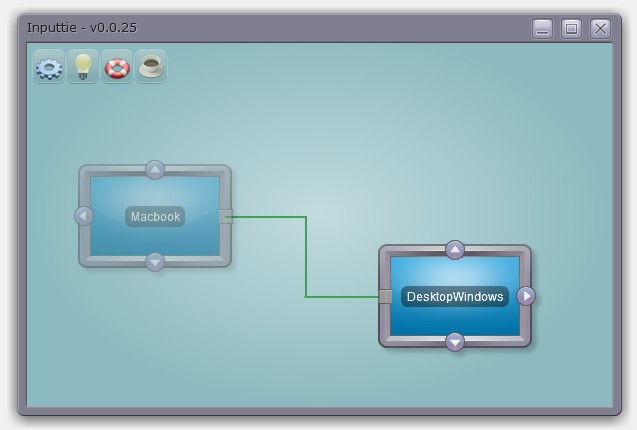
It's an Adobe AIR 2 application so it means it will look and work the same across all supported operating systems (Mac, Windows, Linux). AIR also makes it super easy to install and update so for most users it should be a very simple matter to get it up and running.
The way it works is simple. When opened it automatically detects other devices on your network that have Inputtie running. You then make a connection between your two devices by simply dragging and dropping an arrow from one device to another:
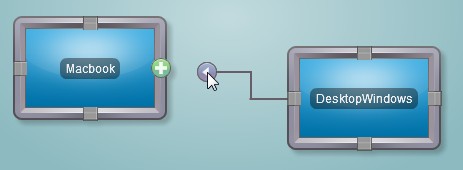
Do the same on the other device and your computers are now connected, its that simple! Now when you move your mouse across to the side of the screen (side dependant on which arrow you picked) it will magically appear on the screen of the other device, splendid!
Now over there you can use your keyboard and mouse as normal and the input will be transferred over.
You can even also copy and paste text from one device to the other. This is great when you just want to blast a URL or some other bit of text to the laptop or back again without having to send emails or use IM or make a text file and send it over a network or anything else.
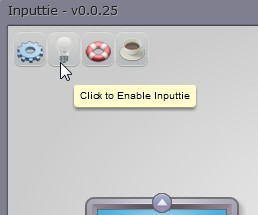
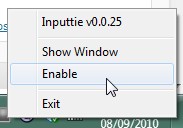
If you want to fire up a game or something that inputtie may interfere with you can simply and easily toggle it to disabled:
Website
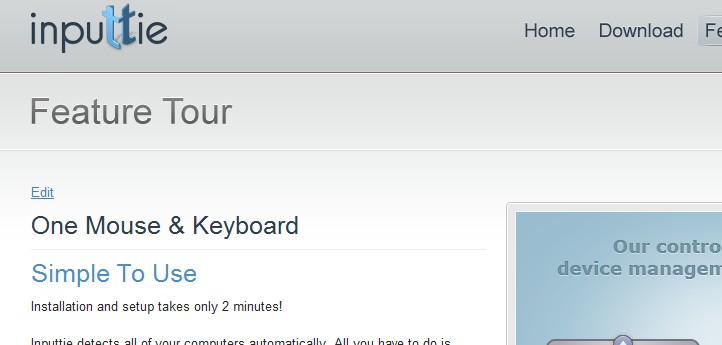
Early into the project I teamed up with my partner in crime and jack-of-all-trades Oliver Pitceathly. The original idea was to release this as a commercial product so we wanted to have a nice high-quality website as a landing page for potential customers. In the latter stages of the product we decided to drop the commercial aspect and make it donation-ware instead.
Despite my constant badgering and mind-changing Oli has done a fantastic job on the website, it looks simply great!
He even found time to do an awsome video that shows off the best features of Inputtie:
Planned Extensions
There are many potential extensions that you could imagine would be really handy.
Imagine being able to tare a tab from your desktop browser then drag it over to your laptop and having it then appear there.
Even better how about simply dragging a file or folder over then having it transfer quickly, be pausable, restartable, and toggle the bandwith it uses. All possible and planned extensions in Inputtie.
Another idea is using the multi-touch track pad on the macbook to interact in a multi-touch fashion with windows 7 on your desktop.
Beta
"So where can I get my hands on it?" you cry. Well we haven't actually release it for download just yet, there are some niggley bugs and things to work out with it still. If you are interested in testing it out tho sign up for the beta over at inputtie.com and ill shoot you a mail when its ready to go!
Wednesday, 10 February 2010
On the Bleeding Edge
Well it thought it was about time I did some posting about my personal project im working on at the moment as I havent spoken about my coding for a while.
For a while now (alot longer than I had hoped for) I have been working on a project that falls outside the realms of my usual kind of games-related projects. Im not ready do describe exactly what it is yet but im excited about it.
For months I have been struggling with the techinal challenges the project has entailed and I have dabbled with many new and highly diverse technologies including JavaFX (Java), Qt (C++) and Mono (C#). I have been looking for a cross-platform technology that will get the job done that I need and doing it in an elegant manner.
I thought I had found it with a combination of JavaFX and straight Java using the PureMVC framework. I however was plagued with problems throughout with Bonjour, jGroups, JmDNS, JNI and JNA.
So after months of work, hardship and struggles I read a very interesting article on the up-and-coming Adobe AIR 2.0 that was opened for beta in December. With 2.0 Adobe are bringing NativeProcess to Air. What this means is that you can you can execute native code (.dlls, .so, .jar etc) from Air. To me this was bloody brilliant as I had been playing with Air reccently and my day-job heavily involves Flex and I simply love the power and beauty of Flex.
So what this meant to me was that I could write the bulk of my project including its interface in my much preferred Adobe Flex (Air) and then use Native Process to communicate with a small kernel of Java that would do all the dirty work that Air itself cant do.
So after a little playing with Flerry for Air->Java bridge I started to think about the structure of the code and the framework I would use. For my initial few runs at this project I had been using the Java version of PureMVC. I really like some aspects of PureMVC but I think its can be so overly cumbersome in some circumstances (ill write another post on this in the future I think). So instead I looked at the alternatives.
I have been using Mate alot recently at work and on my own mini-project the Audio Book Organiser. However as this project is partly for my own learning and personal growth I decided to look at what else there was out there. From the videos by Jessie Warden I had heard about Robot Legs. Apparently this framework has been around for a while, but it was the first I had heard of it. Taking at look at it I immediately became very excited as it looks like it offers all the things that make PureMVC great but without the extra coding-baggage that goes with it.
To add to my interest it appears another very interesting, very new action-script technology has been introduced into Robot Legs called Signals by Robert Penner. Signals is an alternative to the standard events dispatching method found throughout flash (more on this in another post).
So why have I called this post "the bleeding edge?". Well Adobe Air 2.0 is still in beta and has only been for a month or so. Its so new that some parts still havent been documented atall and the only way to find out how they work is to post a msg to the devs on the forums. Signals is also new and its integration into Robot Legs is very new indeed (last coupple of weeks). So at the moment I feel as if im at the forefront of some very new, very exciting technology, a stark contrast to my fiddlings with the ancient Java.
I realise this post is very text and tech-heavy but I needed to post about it before I forgot all the pain I have gone through with this project to get where I am at the moment. Future posts ill be delving a little deeper into some of my experiments with these new technologies ;)
For a while now (alot longer than I had hoped for) I have been working on a project that falls outside the realms of my usual kind of games-related projects. Im not ready do describe exactly what it is yet but im excited about it.
For months I have been struggling with the techinal challenges the project has entailed and I have dabbled with many new and highly diverse technologies including JavaFX (Java), Qt (C++) and Mono (C#). I have been looking for a cross-platform technology that will get the job done that I need and doing it in an elegant manner.
I thought I had found it with a combination of JavaFX and straight Java using the PureMVC framework. I however was plagued with problems throughout with Bonjour, jGroups, JmDNS, JNI and JNA.
So after months of work, hardship and struggles I read a very interesting article on the up-and-coming Adobe AIR 2.0 that was opened for beta in December. With 2.0 Adobe are bringing NativeProcess to Air. What this means is that you can you can execute native code (.dlls, .so, .jar etc) from Air. To me this was bloody brilliant as I had been playing with Air reccently and my day-job heavily involves Flex and I simply love the power and beauty of Flex.
So what this meant to me was that I could write the bulk of my project including its interface in my much preferred Adobe Flex (Air) and then use Native Process to communicate with a small kernel of Java that would do all the dirty work that Air itself cant do.
So after a little playing with Flerry for Air->Java bridge I started to think about the structure of the code and the framework I would use. For my initial few runs at this project I had been using the Java version of PureMVC. I really like some aspects of PureMVC but I think its can be so overly cumbersome in some circumstances (ill write another post on this in the future I think). So instead I looked at the alternatives.
I have been using Mate alot recently at work and on my own mini-project the Audio Book Organiser. However as this project is partly for my own learning and personal growth I decided to look at what else there was out there. From the videos by Jessie Warden I had heard about Robot Legs. Apparently this framework has been around for a while, but it was the first I had heard of it. Taking at look at it I immediately became very excited as it looks like it offers all the things that make PureMVC great but without the extra coding-baggage that goes with it.
To add to my interest it appears another very interesting, very new action-script technology has been introduced into Robot Legs called Signals by Robert Penner. Signals is an alternative to the standard events dispatching method found throughout flash (more on this in another post).
So why have I called this post "the bleeding edge?". Well Adobe Air 2.0 is still in beta and has only been for a month or so. Its so new that some parts still havent been documented atall and the only way to find out how they work is to post a msg to the devs on the forums. Signals is also new and its integration into Robot Legs is very new indeed (last coupple of weeks). So at the moment I feel as if im at the forefront of some very new, very exciting technology, a stark contrast to my fiddlings with the ancient Java.
I realise this post is very text and tech-heavy but I needed to post about it before I forgot all the pain I have gone through with this project to get where I am at the moment. Future posts ill be delving a little deeper into some of my experiments with these new technologies ;)
Sunday, 13 December 2009
Flirting With JavaFX
For the past several months I have been working on a little project completely different to anything I have done before. Its a desktop application that uses a number of novel technologies to do something I think is pretty cool. Ill talk more about what it actually is and does in the coming weeks, but for this post I just want to talk about the struggles and discoveries I have been through and made with the technology.
One of the basic tenants of the app is that it needs to work cross-platform, so on mac, windows, linux, etc. As my previous experience with any sort of cross-platform coding involves using Java that was my natural first choice.
It has been a while since I have coding anything substantial in Java, infact my university project Chain Reaction was my last serious foray into the language:

I knew that I wanted a nice rich interface for the project as it was intended to be sold to non-technical users. My first choice with Java was naturally with Swing. This, however, soon brought back various memories of 'JPanels', 'Layouts' and 'Look and Feels' and the headaches of trying to make simple things look attractive (tho some cool advances have been made with substance look and feel).
After having worked for years with Flash / Flex I had grown used to the ease of drawing graphics and manipulating Display Objects in the display hierarchy. I was dismayed at how difficult it was to do what I considered 'simple graphic tasks' using Java! A simple google search for the terms "Java 2d graphics" demonstrates how old some of the concepts and documentation is on the subject.
I ended up writing and rewriting my view using different libraries like G:

I found them all to be unwieldy and too inflexible for what I had in-mind. It all just seemed so archaic and old-hat.
So I was becoming more and more frustrated with myself for not progressing with the project and becoming hung up on something I had taken for granted in the Flash world. It was then that I happened to stumble across (this is after weeks of struggling) the JavaFX project. Now I had heard about this many months back but had dismissed it as Suns rather lame attempt to steal some of Adobe's dominance of the Flash player market (much like Microsoft's attempt with Silverlight).
As I was at the end of my line with Java I thought, hell why not give it a little look. Well it took me by surprise. It turns out that JavaFX is rather neat!
For those who havent heard f JavaFX; taken from Wikipeda:
What this means is that you can (with a little jiggery pokery) use JavaFX with normal Java. This is great as I had already written a whole load of code in Java which I didn't want to get rid of.
The language JavaFX Script is great. It took a little getting used to as it is a declarative language (much like Flex's MXML except that instead of using XML as the language it uses a Java Script like notation) but once I was used to it I could immediately see the awesome power it brings.
A little sample of code to give you a feel of how its declarative approach works:
This is your standard "Hello World" (but with a British twist):

The simplicity of rendering things to the screen was just what I was looking for as the for this project, it was a double bonus that the language is powerful.
I love some of the features of the language like the natively build in binding, the sequence manipulations, but Ill talk more about some of these features in another post as I have rambled enough in this one as it is.
For now however, if you want to do some more reading into JavaFX I HIGHLY this short set of tutorials: Learning the JavaFX Programming Language - Tutorial
avaFX is a software platform for creating and delivering rich Internet applications that can run across a wide variety of connected devices. The current release (JavaFX 1.2, June 2009) enables building applications for desktop, browser and mobile phones. TV set-top boxes, gaming consoles, Blu-ray players and other platforms are planned.
JavaFX is fully integrated with the Java Runtime Environment (JRE) – JavaFX applications will run on any desktop and browser that runs the JRE and on top of mobile phones running Java ME.
JavaFX is a software platform for creating and delivering rich Internet applications that can run across a wide variety of connected devices. The current release (JavaFX 1.2, June 2009) enables building applications for desktop, browser and mobile phones. TV set-top boxes, gaming consoles, Blu-ray players and other platforms are planned.
JavaFX is fully integrated with the Java Runtime Environment (JRE) – JavaFX applications will run on any desktop and browser that runs the JRE and on top of mobile phones running Java ME.
One of the basic tenants of the app is that it needs to work cross-platform, so on mac, windows, linux, etc. As my previous experience with any sort of cross-platform coding involves using Java that was my natural first choice.
It has been a while since I have coding anything substantial in Java, infact my university project Chain Reaction was my last serious foray into the language:
I knew that I wanted a nice rich interface for the project as it was intended to be sold to non-technical users. My first choice with Java was naturally with Swing. This, however, soon brought back various memories of 'JPanels', 'Layouts' and 'Look and Feels' and the headaches of trying to make simple things look attractive (tho some cool advances have been made with substance look and feel).
After having worked for years with Flash / Flex I had grown used to the ease of drawing graphics and manipulating Display Objects in the display hierarchy. I was dismayed at how difficult it was to do what I considered 'simple graphic tasks' using Java! A simple google search for the terms "Java 2d graphics" demonstrates how old some of the concepts and documentation is on the subject.
I ended up writing and rewriting my view using different libraries like G:

I found them all to be unwieldy and too inflexible for what I had in-mind. It all just seemed so archaic and old-hat.
So I was becoming more and more frustrated with myself for not progressing with the project and becoming hung up on something I had taken for granted in the Flash world. It was then that I happened to stumble across (this is after weeks of struggling) the JavaFX project. Now I had heard about this many months back but had dismissed it as Suns rather lame attempt to steal some of Adobe's dominance of the Flash player market (much like Microsoft's attempt with Silverlight).
As I was at the end of my line with Java I thought, hell why not give it a little look. Well it took me by surprise. It turns out that JavaFX is rather neat!
For those who havent heard f JavaFX; taken from Wikipeda:
JavaFX is a software platform for creating and delivering rich Internet applications that can run across a wide variety of connected devices. The current release (JavaFX 1.2, June 2009) enables building applications for desktop, browser and mobile phones.
TV set-top boxes, gaming consoles, Blu-ray players and other platforms are planned.JavaFX is fully integrated with the Java Runtime Environment (JRE) – JavaFX applications will run on any desktop and browser that runs the JRE and on top of mobile phones running Java ME.

What this means is that you can (with a little jiggery pokery) use JavaFX with normal Java. This is great as I had already written a whole load of code in Java which I didn't want to get rid of.
The language JavaFX Script is great. It took a little getting used to as it is a declarative language (much like Flex's MXML except that instead of using XML as the language it uses a Java Script like notation) but once I was used to it I could immediately see the awesome power it brings.
A little sample of code to give you a feel of how its declarative approach works:
Stage {
    title: "Ello World"
    width: 300
    height: 300

    scene: Scene {
        content: [
             Text {
               font: Font { size: 22 }
               x: 20, y: 90
               textAlignment: TextAlignment.CENTER
               content:"Ello World!"
             }
        ]
     }
}
This is your standard "Hello World" (but with a British twist):
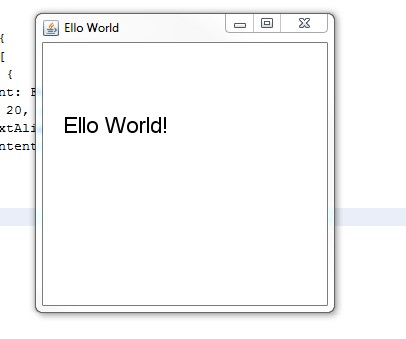
The simplicity of rendering things to the screen was just what I was looking for as the for this project, it was a double bonus that the language is powerful.
I love some of the features of the language like the natively build in binding, the sequence manipulations, but Ill talk more about some of these features in another post as I have rambled enough in this one as it is.
For now however, if you want to do some more reading into JavaFX I HIGHLY this short set of tutorials: Learning the JavaFX Programming Language - Tutorial
avaFX is a software platform for creating and delivering rich Internet applications that can run across a wide variety of connected devices. The current release (JavaFX 1.2, June 2009) enables building applications for desktop, browser and mobile phones. TV set-top boxes, gaming consoles, Blu-ray players and other platforms are planned.
JavaFX is fully integrated with the Java Runtime Environment (JRE) – JavaFX applications will run on any desktop and browser that runs the JRE and on top of mobile phones running Java ME.
JavaFX is a software platform for creating and delivering rich Internet applications that can run across a wide variety of connected devices. The current release (JavaFX 1.2, June 2009) enables building applications for desktop, browser and mobile phones. TV set-top boxes, gaming consoles, Blu-ray players and other platforms are planned.
JavaFX is fully integrated with the Java Runtime Environment (JRE) – JavaFX applications will run on any desktop and browser that runs the JRE and on top of mobile phones running Java ME.
Subscribe to:
Posts (Atom)