Showing posts with label Personal. Show all posts

Thursday, 23 May 2013

The Trip 2013 - Chicago

screenshot_08

Note: This is a condensed version of the pictures I took with some added narrative. The rest of the pics can be viewed in the album The Trip 2013 – Chicago. Each picture can be clicked to see a larger version and comment / like

May the 15th just 8 days after I had started I took a flight from Toronto to Chicago. I was flying into the windy city to see the sights and meet my good uni mate Mark. Mark was due to arrive the following day with a few other friends of his from back in England they were all over here visiting their friend Damien.

I arrived late afternoon and made my way to the hostel I was staying at downtown. This place was quite a change from the hostel in Toronto, it was HUGE. 6 floors of dorms with each dorm being about twice the size of the ones in Toronto. Apparently it is one of the biggest hostels in the world. It felt more like a hotel than a hotel.

That first night I headed north to meet Damien for the first time. We hung out is his local, drinking local beers and Jager (ughh). We went for some food around the corner and I managed to sample Chicago style pizza, which is odd with the tomato and cheese positioning reversed so the cheese is on the bottom with tomato on top. It tasted great still.

The following day I spent downtown doing some touristy things. I visited the flagship McDonalds:

macdonalds

I spent some time down by the waterfront updating my diary.

diarywater

I saw some wierd mushroom buildings.

mushroom

The city was really beautiful, helped by the fact that there was tons of bushes in bloom:

bloom

That evening I met up with Mark and the lads and we went out for drinks downtown. I met some more of Damien's friends including a girl named Angee who is Venezuelan and informed me that if I go to Venezuela I am totally going to get mugged / raped, oh joy.

angee

We went to some really cool bars. One called the Rooftop in the Wit had a violinist who riffed along to the house music that the DJ was spinning out, I was in heaven.

violin

Needless to say that was a tough night for the lads with jetag.

mark dead

The following day we went to watch the Cubs loose to the Mets

cubs

It was fun tho I think I prefer ice hockey over baseball, far more action in hockey. It doesnt help that the wind was really cold making where we were sat in the shade even colder.

sat

Still, the beer and nachos helped. Mark and Damien even went for the $18 helmet of them.. mental

helm

After the game we headed across the road to Sluggers, which is a bar with batting nets.

nets

That was really good fun, I have always enjoyed getting involved with sports more than watching them. The fastball nets however were really tough. The ball comes at you at about 60mph which is fairly slow compared to the real pitchers, but unlike the real thing you have no clue when the ball is about to leave the machine. Also unlike the real thing your belly is full of beer, making things trickier :P

The rest of the evening was spent getting messy. At one point we spotted a group of people who were taking their parrot for a walk. I dont think I have ever seen more emotional in an animal than this bird. Just by looking at its eyes you could tell what it was thinking, it was really fascinating.

parrot

A fitting end to to a great stay in the windy city. I rose early the next day to catch a flight to my next destination; North Carolina!

Monday, 25 June 2012

Malaysia 2012


For the past two weeks I have been travelling about Malaysia seeing a very small chunk of what there is to see there.

We started in Kuching on the Borneo island part of Malaysia, we went Kayaking down the bang-bang river:


And checked out some Orangutans in the jungle:


From here we took a short flight to Singapore, where we explored the city for a couple of days:


From Singapore we took a bus journey to Mersing then a (horrific) ferry ride to the beautiful island of Tioman:


The island itself was beautiful with lush jungles, stunning waterfalls and pristine coral snorkalling:


To wrap up our short visit to Malaysia we headed over to Kuala Lumpur:


And that sadly was the end of our journey, what better way to spend the last evening then in the Traders Tower Sky Bar with a view over to the Petronas Towers:

Sunday, 17 October 2010

Inputtie - Version 0.1.5


Just a few small changes in this update:

From the release notes:

Inputtie Version 0.1.5 (17/10/10)

+ Middle mouse input is now caught and transferred between devices
+ More errors are caught in the client
+ Keys are now depressed when a connection is cut, no more lingering Shift, yey!

The new version should automatically download, but if you don't yet have it go grab it on the download page -> http://www.inputtie.com/download/

Thursday, 14 October 2010

My First Chrome Extension - "Post To Tumblr"


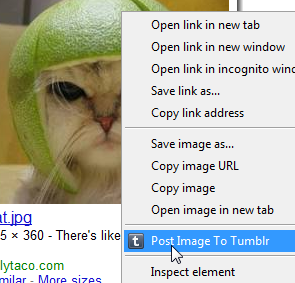
Mummy wow! Im a big boy now! I have just published my first Chrome extension.

It was really annoying me that when I found a funny cat or some other silly image I would have to go through a whole ball-ache process to get that image on my Tumblr account.

What I really wanted was some right-click-post action going on and wondered why no one had one it yet. So with an hour or so to spare I whipped this extension up really quick.

It uses the Chrome 6 Context Menu API so you obviously need to have Chrome 6 to be able to use it.

Currently it only posts images as that's all I needed for now but if enough people want more then ill whip out the other data types.

The source couldn't be any simpler really, infact this is it here:

[codesyntax lang="javascript" lines="normal" blockstate="expanded"]
chrome.contextMenus.create({"title": "Post Image To Tumblr", "contexts":["image"], "onclick": postImage});

function postImage(info, tab)
{
var email = localStorage["tumblr_email"];
var password = localStorage["tumblr_pass"];

if(!email || email=="" || !password || password=="")
{
alert("Need to set your Tumblr username and password in the options before posting!");
}
else
{
var o =
{
"email":email,
"password":password,
"type":"photo",
"source":info.srcUrl
};

var success = function(data,textStatus,request)
{
if(textStatus=="success"){ alert("Image posted to Tumblr. Image -> "+info.srcUrl); }
else { alert("Bad email or password"); }
}

$.post("http://www.tumblr.com/api/write",o, success);
}
}

[/codesyntax]

Simples!

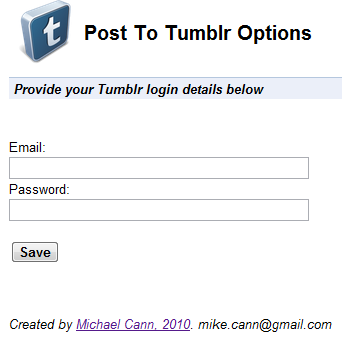
Theres even an option page where you put in your Tumblr details:


Oh, there is one issue.

No matter what I tried I couldn't manage to get the Tumblr API to return an error. So if you enter your username or password incorrectly it still reports success, not entirely sure why, if someone knows I would love to hear why!

Interested? You can go grab it over on the chrome extensions gallery page -> HERE

Wednesday, 22 September 2010

Inputtie - Beta Release!


Woooo Hooo! Finally after almost a years worth of toiling we have finally released the beta version of Inputtie.

Now I have only performed a limited amount of testing so im sure there are going to be bugs-a-plenty. If you find something I would love to hear about it. We dont currently have a dedicated email address you can use for this so just use the contact box on the side of the inputtie page to get in touch.

Anyways, here are the release notes for this version:

Inputtie Version 0.1.3 (22/03/10)
+ Beta Release!
+ Fixed an issue that was causing the mouse pointer to not quite reach the edge of the screen
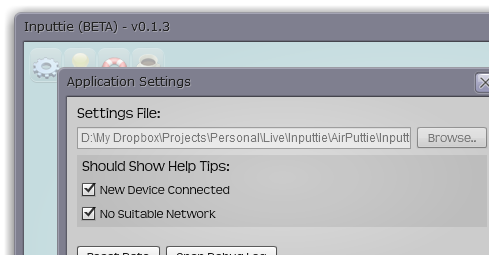
+ Fixed it so that you can now choose not to show the "new device" help tip.
+ New Icons, yey!

Grab the download over on the download page now!

Oh BTW we decided to go with the "e" in a bordered square for our app icon:

Thursday, 9 September 2010

Announcing Inputtie


For the last year or so my major personal-project has been under wraps but after a few intense weeks its finally time to talk about it!

First before I explain exactly what Inputtie is I will talk about why I started this project and the problem I was trying to solve.

(If you aren't interested in all the background fluff and just want to find out what Inputtie is, head over to inputtie.com)

The Problem


About a year ago I was doing a lot of work at home that involved working both on my desktop PC and my MacbookPro. Often I would find myself using my mouse and keyboard on my PC then having to lean accross to use the trackpad and keyboard on my MBP. Now, I hate trackpads so what I started doing was unplugging my keyboard and mouse from my desktop then plugging back into my MBP when I wanted to use it.

This situation was obviously less than ideal, so I started looking around for other solutions. I had heard of hardware you can buy that involves flipping a switch when you want to change which device you want your input to go to. I considered this but thought there must be a more elegant software solution. I had an idea in my head where I wanted you to simply move my mouse pointer off my desktop monitor and it would then magically appear on the laptop screen.

It was at this point I found out about Synergy. I took a good look at it but for the life of me could not get it to work no matter how hard I tried. It also involved lots of fiddley messing around with IP addresses / hostnames and command line parameters (it has improved in a year, but more on that later). So I thought to myself surely there is a better way of doing this, surely its not a tough technical problem to solve!?

The Solution


I had originally intended to talk about the myriad of attempts, blind alleys, different languages and general headaches I endured to get to this point however its a very lengthy topic. So instead in this post im just going to talk about the final solution talk about the previous attempts in later posts.

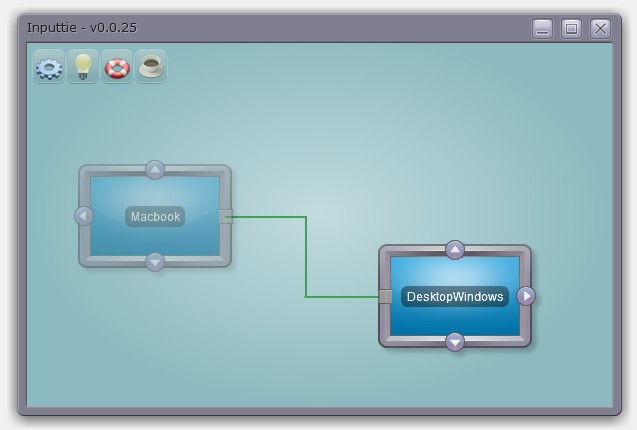
So without any further ado I present a screenshot of Inputtie, so you can get an idea of whats going on:


It's an Adobe AIR 2 application so it means it will look and work the same across all supported operating systems (Mac, Windows, Linux). AIR also makes it super easy to install and update so for most users it should be a very simple matter to get it up and running.

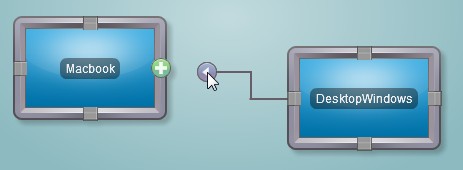
The way it works is simple. When opened it automatically detects other devices on your network that have Inputtie running. You then make a connection between your two devices by simply dragging and dropping an arrow from one device to another:


Do the same on the other device and your computers are now connected, its that simple! Now when you move your mouse across to the side of the screen (side dependant on which arrow you picked) it will magically appear on the screen of the other device, splendid!

Now over there you can use your keyboard and mouse as normal and the input will be transferred over.

You can even also copy and paste text from one device to the other. This is great when you just want to blast a URL or some other bit of text to the laptop or back again without having to send emails or use IM or make a text file and send it over a network or anything else.

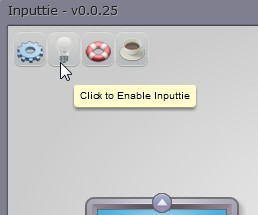
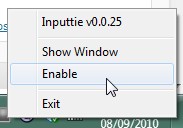
If you want to fire up a game or something  that inputtie may interfere with you can simply and easily toggle it to disabled:


Website


Early into the project I teamed up with my partner in crime and jack-of-all-trades Oliver Pitceathly. The original idea was to release this as a commercial product so we wanted to have a nice high-quality website as a landing page for potential customers. In the latter stages of the product we decided to drop the commercial aspect and make it donation-ware instead.

Despite my constant badgering and mind-changing Oli has done a fantastic job on the website, it looks simply great!


He even found time to do an awsome video that shows off the best features of Inputtie:


Planned Extensions


There are many potential extensions that you could imagine would be really handy.

Imagine being able to tare a tab from your desktop browser then drag it over to your laptop and having it then appear there.

Even better how about simply dragging a file or folder over then having it transfer quickly, be pausable, restartable, and toggle the bandwith it uses. All possible and planned extensions in Inputtie.

Another idea is using the multi-touch track pad on the macbook to interact in a multi-touch fashion with windows 7 on your desktop.

Beta


"So where can I get my hands on it?" you cry. Well we haven't actually release it for download just yet, there are some niggley bugs and things to work out with it still. If you are interested in testing it out tho sign up for the beta over at inputtie.com and ill shoot you a mail when its ready to go!

Saturday, 21 August 2010

Ludum Dare - Hour 11

Thought I would update now I have a basic scene and a controllable player. See for yourself:

Use left and right keys to navigate.


Next step is a gun and destructible terrain, and not forgetting particles!

Sunday, 16 May 2010

Mike Cann & Social Networks

Well as it appears that every day there is a new "Must Join" social network and I appear to have joined most of them I thought I would write a little rundown post of where you can find my digital presence.


http://www.facebook.com/mikeysee

Yes, im on Facebook after years of trying to stay away. Unforuntely as my job is making games for the platform, its kinda tricky to avoid.


http://mikeysee.tumblr.com/

Tumblr is a reccent addition to my collection. Im primarily using it as a dumping ground for stuff that amuses me. Expect photos, videos and madness inside... oh and plenty of cats!


http://twitter.com/mikeysee

Ahh Twitter, that strange little service that is just sooo addictive! Find me, follow me, expect nothing sensible.


http://soundcloud.com/mike-cann

Not exactly  social network, but still find a collection of my mixes ;)


http://picasaweb.google.co.uk/mike.cann

Again, not a social network, just a collection of pictures of me, my friends and my antics.


http://uk.linkedin.com/in/mikecann

Oops! I forgot about LinkedIn! Well you can find some (fairly) up to date information about my skills and job experience ;)