Showing posts with label tumblr. Show all posts

Tuesday, 5 March 2013

PostToTumblr v3.18 - Fixed Tumblr oauth change

head


Just a quick update to say I have now fixed the authentication issue my PostToTumblr that quite a few people contacted me about.

What was going on was that Tumblr appear to have changed the format of the data they return from a token request which was causing a library that PostToTumblr relies on to fail.

Before PostToTumblr can post content on a users behalf it first must get an "access token". This token is given to PostToTumblr as part of the authentication flow.

When PostToTumblr first starts up it checks to see if it still has a valid token (they can expire over time and other various reasons). If it doesnt it must go through the authentication flow. Firstly it redirects the user to the grant permission dialog:

screenshot_02

When the user clicks allow Tumblr then returns an "oauth token" and an "oauth verifier" to PostToTumblr, which it can then use to get an "access token" which is used to do the posting.

The problem that this update fixed was that the "oauth verifier" that was returned from Tumblr changed:

screenshot_03

You see at the end of the query string there is now a "#_=_" well this was causing havoc with the URL parameter parsing code in the Google oauth library I was using.

My solution is quick and dirty, just strip out the "#_=_" from the url while parsing:
// MIKE HACK!!	  
if(param.indexOf('oauth_verifier=')!=-1)
{
param = param.replace('oauth_verifier=','');
param = param.replace('#_=_','');
decoded['oauth_verifier'] = ChromeExOAuth.fromRfc3986(param);
}
else
{
var keyval = param.split("=");
if (keyval.length == 2) {
var key = ChromeExOAuth.fromRfc3986(keyval[0]);
var val = ChromeExOAuth.fromRfc3986(keyval[1]);
decoded[key] = val;
}
}


Well I hope this helps anyone else that may encounter this issue too!

Sunday, 13 January 2013

PostToTumblr v3.12 Update

head

I have finally found some time to do a long overdue update to my popular Chrome extension PostToTumblr built using Haxe. 30,000 people currently have the extension installed and they post about 10,000 images, links, quotes per day so I thought it was about time to give it some love.

The list of improvements are:
+ One-Click posting now available in the options
+ Tall images now no longer appear off the screen
+ Notifications now used instead of popups
+ Improved error detection
+ Improved authorization process

The main feature in the update is the one-click posting. This much-requested feature was available in the original PostToTumblr but for various reasons never made it into the latest reincarnation.

screenshot_01

Once enabled in the options it enables the user to bypass the post preformatting window that usually pops up and instead posts with some default settings. If you have more than one blog the post menu gives you the option for which blog you would like the post to go to:

screenshot_05

The normal popup "posting.." window has been replaced with HTML5 notifications.

screenshot_02

This should make posting a smoother, less intrusive process.

If you haven't got the extension already you can grab it on the Chrome Store else Chrome should auto-update the extension for you very soon!

Tuesday, 11 September 2012

All New Post To Tumblr Chrome Extension created with Haxe & Robotlegs


I have been working off and on for a while on an update to my popular Chrome Extension 'Post To Tumblr' and seeing as Tumblr have just changed thier API I thought it was time to accelerate its development and release it, finally.

First some screenshots to give you an idea of what it does:


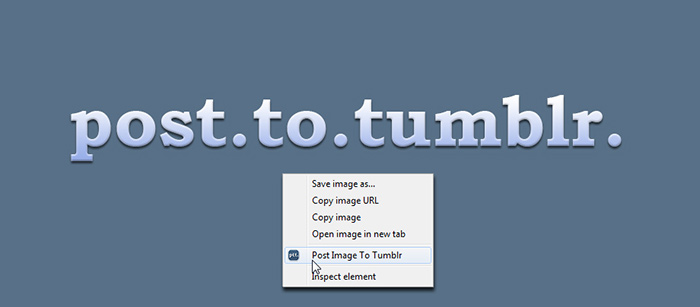
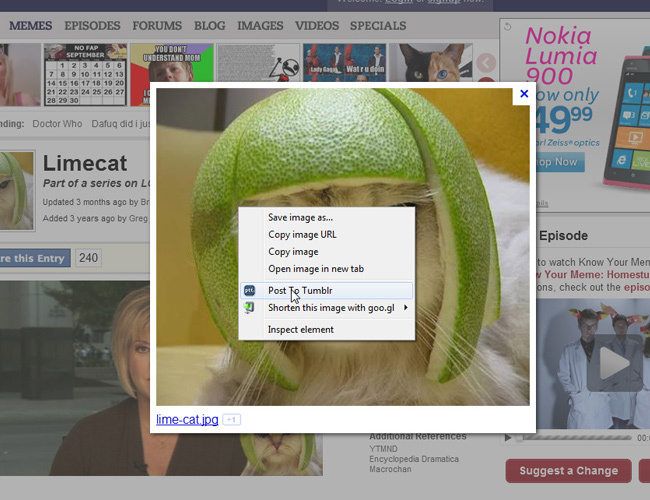
You can right-click any thing on a page and "Post To Tumblr".


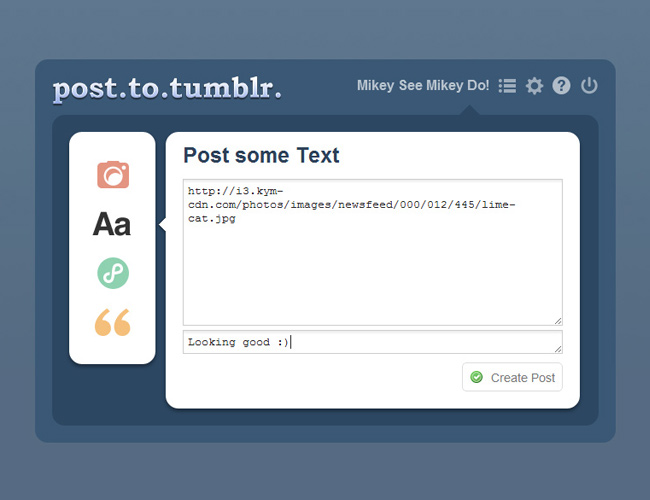
A new tab opens where you can format it how you like.


You can change the post type very easily.


When done you just "Create Post"

This version is written totally from scratch using Haxe's Javascript target. Although not strictly necessary for something as simple as this I thought it was a good opportunity to experiment around with Haxe's JS capabilities. I must admit I was pleasantly surprised at how well it worked.

Most stuff just worked. There are also plenty of externs out there for the popular Javascript libraries on lib.haxe.org such as the "chrome-extension" library.

Having type-safe Javacript is great for for so many reasons that im not going to get into here. I must admit however there were times when I was lazy and didn't want fancy creating a type-safe extern class for a library. Fortunately however Haxe has a mechanism for the lazy coder in the form of "untyped".

An example of this is the way in which you access the "localStorage" object in chrome extensions. localStorage is basically a global object that you can set keys and values in and will persist for the life of your extension. To access it you use: "localStorage[myKey]" to return a value. If you tried to do that in Haxe it would throw an error because Haxe has no concept of global variables (quite rightly).

So to access the localStorage you can use untyped to quickly get access to a global variable, I then decided to wrap this little hack in a Model class to make it a little neater:

[codesyntax lang="actionscript3" lines="normal"]
package models;
import js.Lib;

/**
* ...
* @author MikeC
*/

class ChromeLocalStorageModel extends BaseModel
{

public function get(key:String) : Dynamic
{
var val = untyped localStorage[key];
trace('Getting from localStorage: '+key+" :: "+val);
return val;
}

public function set(key:String, val:Dynamic) : Void
{
trace('Saving in localStorage: '+key+" :: "+val);
untyped localStorage[key] = val;
}

}

[/codesyntax]

This lets you just just mix and match the type-safe stuff when you need to and just do a little "hack" when you need to ;)

The above example also shows off another cool feature im using in Post To Tumblr, which is RobotLegs. Thanks to the fact that the RobotHaxe library is written in pure Haxe (has no platform specific bits) that means I am able to use it on a Javascript project.

The only problem is the issue with Views and Mediation. Because unlike Flash events don't bubble up to a central source there is no way to do automatic mediation in the JS target. Instead what you do is implement "IViewContainer" on your context view, then whenever a child is added or removed you call viewAdded() or viewRemoved() that way the MediatorMap can try to make a mediator for that view.

Im not sure if the way I have used RobotLegs is the correct or best way, it was more of an experiment as I went along. The way I have done it is to wrap many of the main HTML elements in my own view classes. So for example I have a "DivView" that represents a "div" and extends BaseView:

[codesyntax lang="actionscript3" lines="normal"]
class DivView extends BaseView
{

public function new(elementId:String=null)
{
super(Lib.document.createElement('div'));
if (elementId != null) element.id = elementId;
}

}

[/codesyntax]

BaseView implements the IViewContainer interface:

[codesyntax lang="actionscript3" lines="normal"]
class BaseView implements IViewContainer
{
public var viewAdded:Dynamic -> Void;
public var viewRemoved:Dynamic -> Void;

public var element : HtmlDom;
public var parent : BaseView;
public var children : Array;

....

public function new(element:HtmlDom)
{
this.element = element;
this.children = [];
isLayoutInvalid = true;
}

...

public function add(child:BaseView) : BaseView
{
children.push(child);
child.parent = this;
child.viewAdded = viewAdded;
child.viewRemoved = viewRemoved;
if(viewAdded!=null) child.addChildren();
element.appendChild(child.element);
if (viewAdded != null) viewAdded(child);
return child;
}

public function remove(child:BaseView) : Void
{
if (viewRemoved != null) child.removeChildren();
children.remove(child);
child.parent = null;
child.viewAdded = null;
child.viewRemoved = null;
element.removeChild(child.element);
if (viewRemoved != null) viewRemoved(child);
}

...

}

[/codesyntax]

Then say I want to construct the following html:

[codesyntax lang="html4strict"]
<div id="container">
<div id="inner">Hello World!</div>
</div>

[/codesyntax]

I would do something like this:

[codesyntax lang="actionscript3" lines="normal"]
class MainPopupContainer extends DivView
{
private var inner : DivView;

public function new()
{
super("container");

inner = new DivView("inner");
inner.element.innerHTML = "Hello World!";
add(inner);
}
}

[/codesyntax]

Then perhaps I want to turn the "Hello World!" red when clicked I would do something like this:

[codesyntax lang="actionscript3" lines="normal"]
class MainPopupContainer extends DivView
{
private var inner : DivView;

public function new()
{
super("container");

inner = new DivView("inner");
inner.element.innerHTML = "Hello World!";
add(inner);

new JQuery(inner.element).click(onInnerClicked);
}

private function onInnerClicked()
{
inner.element.style.color = "#FF0000";
}
}

[/codesyntax]

What this means is you have a RobotLegs-familiar looking View with a Mediator behind it (thanks to the mediation happening when you call add()) which is nice. What it does mean however is I have quite abit of boiler plate wrapping the HTML nodes, which definitely slowed down my development.

Another thing im not sure about is my mixing of in-line styles and stylesheets. Sometimes I would use the styles in my css and other times I would just set them on the element directly. To be honest, because I was using classes and inheritance and all that good stuff I usually found it easier and more expedient to set the styles inline in my View class rather than go digging through several hundred lines of css to find the selector I was looking for

For example I may have a "HeaderOptionButton" that defines some inline styles then whenever I wanted a button that looked and acted like a header button I would just make and add a HeaderOptionButton. I know im probably going to get flamed to hell and back for that!

As I said, im not sure if im doing it the "right" or "best" way, its just the way that seemed to work at the time ;)

Well that's a quick overview of where im at. Once I have cleaned the project up a little and added some missing features ill be sticking the source up on GitHub for anyone interested.

Sunday, 19 June 2011

PostToTumblr 0.8 - 8000 Users and Counting


I cant believe how well my humble little extension for the chrome browser is doing. 8000 users when just a few months ago I was celebrating 1.5k.

There were so many requests for new features and things that I thought I would push an update out this evening to add a little more functionality.

From the change log:
- v.0.8 -- 19/06/11 --
+ Text, Page, and Links are now supported in addition to Images
+ Added an app icon to the bar for easy access to the options

To highlight these new changes I decided to update the promo video too:


I have also added a donation button into the options. I have no idea if anyone will click it, an interesting experiment tho.

If you have it installed it should auto-update, if not go grab it over on the chrome app store: https://chrome.google.com/webstore/detail/dbpicbbcpanckagpdjflgojlknomoiah

Wednesday, 1 December 2010

PostToTumblr v0.6


Just a quick update to my chrome extension tonight. I recently had an email asking if there was a way I could make it so that you could send a Tweet at the same time as posting to Tumblr.

After a quick check on the Tumblr API to confirm that yes Tumblr supports the "post-to-twitter" option I spun out this little option.

So now you have three options for tweeting when posting: "no", "auto" and "prompt".

Chrome should auto-update the extension for you soon. If you dont have it hope over to the gallery page here.

Sunday, 31 October 2010

Post To Tumblr Version 0.4


Today is a small update day it seems.

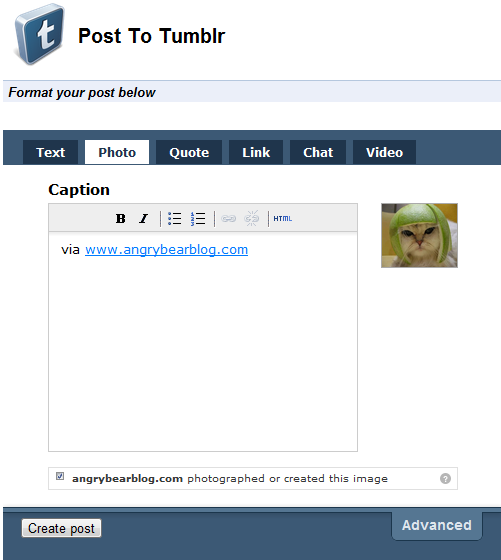
I have updated my Post To Tumblr extension again. I was getting a couple of requests for the ability to add a 'caption' to a post before the image is uploaded so I cranked out this little feature. You can enable it in the options.

Once enabled rather than immediately posting the image it will popup a new tab allowing you to add a caption or whatever to your post:


Its not perfect, I would have preferred the pre formatting window to open in a div popup on the current page instead of a whole new tab, but for now this solution is simple and it works.

I must admit I borrowed the idea from another Tumblr posting extension called "Share on Tumblr". The code is ultra simple:

[codesyntax lang="html4strict"]
<html>
<head>
<script>

// Thanks to share on tumblr extension for this
chrome.tabs.getSelected(null, function(tab)
{
var url = getParam(tab.url,"u")
//var url = encodeURIComponent(getParam(tab.url,"u"));
var finalurl="http://www.tumblr.com/share?v=3&u="+url+"&s=";
document.getElementById("container").src=finalurl;
});

// Thanks http://www.netlobo.com/url_query_string_javascript.html
function getParam( url, name )
{
name = name.replace(/[\[]/,"\\\[").replace(/[\]]/,"\\\]");
var regexS = "[\\?&]"+name+"=([^&#]*)";
var regex = new RegExp( regexS );
var results = regex.exec( url );
if( results == null )
return "";
else
return results[1];
}

</script>
<link rel="stylesheet" href="main.css" type="text/css"/>
</head>
<body>
<div id="header">
<h1>Post To Tumblr</h1>
</div>
<div class="section-header first"><em>Format your post below</em></div>
<br >
<iframe id="container" style="width:500px;height:430px;border:0px" src=""></iframe></body>
</html>

[/codesyntax]

It just opens an iframe with the Tumblr Share page. Simples!

Sunday, 17 October 2010

Post To Tumblr - v0.2


Just a quick update to my first chrome extension.

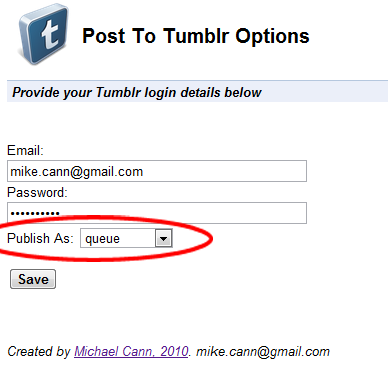
Following a request someone left in the comments I have now added an option to set how the post should be published. So now you can choose whether you want your cat with a lime on its head to be posted to your drafts or your queue or simply to your default wall.

You can grab the new version in the usual place on the Chrome Extensions Gallery -> https://chrome.google.com/extensions/detail/dbpicbbcpanckagpdjflgojlknomoiah?hl=en

I think it updates by its itself, but I cant be sure!

Enjoy!

Thursday, 14 October 2010

My First Chrome Extension - "Post To Tumblr"


Mummy wow! Im a big boy now! I have just published my first Chrome extension.

It was really annoying me that when I found a funny cat or some other silly image I would have to go through a whole ball-ache process to get that image on my Tumblr account.

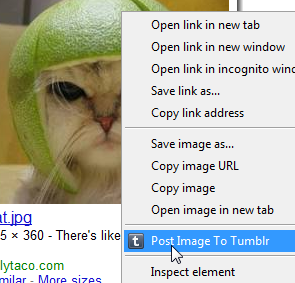
What I really wanted was some right-click-post action going on and wondered why no one had one it yet. So with an hour or so to spare I whipped this extension up really quick.

It uses the Chrome 6 Context Menu API so you obviously need to have Chrome 6 to be able to use it.

Currently it only posts images as that's all I needed for now but if enough people want more then ill whip out the other data types.

The source couldn't be any simpler really, infact this is it here:

[codesyntax lang="javascript" lines="normal" blockstate="expanded"]
chrome.contextMenus.create({"title": "Post Image To Tumblr", "contexts":["image"], "onclick": postImage});

function postImage(info, tab)
{
var email = localStorage["tumblr_email"];
var password = localStorage["tumblr_pass"];

if(!email || email=="" || !password || password=="")
{
alert("Need to set your Tumblr username and password in the options before posting!");
}
else
{
var o =
{
"email":email,
"password":password,
"type":"photo",
"source":info.srcUrl
};

var success = function(data,textStatus,request)
{
if(textStatus=="success"){ alert("Image posted to Tumblr. Image -> "+info.srcUrl); }
else { alert("Bad email or password"); }
}

$.post("http://www.tumblr.com/api/write",o, success);
}
}

[/codesyntax]

Simples!

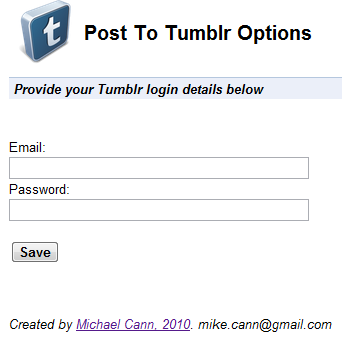
Theres even an option page where you put in your Tumblr details:


Oh, there is one issue.

No matter what I tried I couldn't manage to get the Tumblr API to return an error. So if you enter your username or password incorrectly it still reports success, not entirely sure why, if someone knows I would love to hear why!

Interested? You can go grab it over on the chrome extensions gallery page -> HERE