Showing posts with label haxe. Show all posts

Thursday, 20 October 2011

GPU State Preserving Particle Systems with WebGL & HaXe


Well this is the post I didnt think was going to happen. I have been struggling for weeks with this little bit of tech, ill explain more about why it has been so difficult in another post. For now however, ill just talk about this sample.

So the idea was to build upon what I had been working with previously with my stateless particles systems with WebGL and HaXe. The intention from the start was to replicate some of my very early work (from 2007) on state preserving particle systems in WebGL.

Before I go any further, you can check it out in action here:
http://mikecann.co.uk/projects/HaxeWebGLParticles/ 

First a quick reminder. The difference between a stateless and state-preserving particle simulation is that in the latter we store and update the positions, velocities and other properties of each particle per frame, allowing us to interact and control the simulation. This differs from the stateless particle simulation (detailed in my previous post), where the position for each particle is calculated each frame based on a fixed algorithm.

A fairly reccent addition to WebGL made this possible, namely texture lookups in the vertex shader (aka Vertex Texture Fetch). I wont go over the exact details how this makes state preserving particle systems possible as I have already documented it in my earlier work. A brief explanation is that it allows you to use the fragment shader to perform the updates on particle state stored in textures then use the vertex shader to map those states to a point-sprite vertex buffer.

Basically what this means is that the entire particle simulation can be contained and updated on the GPU, which means no read-back. This allows us to achieve simulations of millions of particles without too much difficulty (depending on GPU ofcourse).

I have uploaded the source for people to perouse at their leisure:
https://github.com/mikecann/HaxeWebGLParticles

As usual it was written using the JS target of HaXe so it should be fairly easy to understand whats going on if you have written any Ecma-script-like-language. Im going to detail this in my next post, but the code isnt the best I have ever written as its a result of a mish-mash of various samples and examples I have found on the web. If anyone has any comments on things that are wrong or could be done better I would be very happy to hear about them.

Sunday, 9 October 2011

Conway's Game of Life in haXe [NME & MassiveUnit]


The second day of try{harder} was dedicated to a single topic; test driven development (TDD).

The group was split into pairs and given the task of using TDD to write a solver for the game of life in AS3. After an hour we then threw away everything we had done, swapped partners and repeated the process.

This was extremely valuable for me as I had never written a unit test before. Seeing how different people tackled the same problem was fascinating and informative.

After repeating the process three times Stray asked if I was interested in teaming up with another attendee of the conference Alec McEachran to investigate unit testing in haXe. It was a great idea as it meant we both could investigate how unit testing worked in haXe and it would give me another code example for my talk the following day.

After a brief search we decided on Mike Stead's MassiveUnit for testing as the testing syntax looked similar to FlexUnit and it contained a toolchain for running the tests on multiple platforms.

An example of a test we wrote is:

[codesyntax lang="actionscript3" lines="normal"]
package ;
import massive.munit.Assert;
import Grid;

/**
* ...
* @author MikeC & Alec McEachran
*/

class GridTest
{
public var grid : Grid;

@Before
public function before():Void
{
grid = new Grid(3, 3);
}

@After
public function after():Void
{
grid = null;
}

@Test
public function initiallyThereAreNoLiveNeighbors():Void
{
var liveNeighbors = grid.getLiveNeighbors(1, 1);
Assert.isTrue(liveNeighbors == 0);
}

@Test
public function liveNeighborCountIsAccurate():Void
{
grid.set(0, 0, true);
grid.set(1, 0, true);
grid.set(2, 1, true);

var liveNeighbors = grid.getLiveNeighbors(1, 1);
Assert.isTrue(liveNeighbors == 3);
}

}

[/codesyntax]

It should look fairly familiar to anyone who has used FlexUnit before. The metatags @Before @After and @Test perform in exactly the same way as they do in FlexUnit. Another benefit of using munit over the built in testing framework in haXe is that you are given a tool to run tests on all platforms simultaneously:

[codesyntax lang="text"]
 haxelib run munit test test.hxml

[/codesyntax]

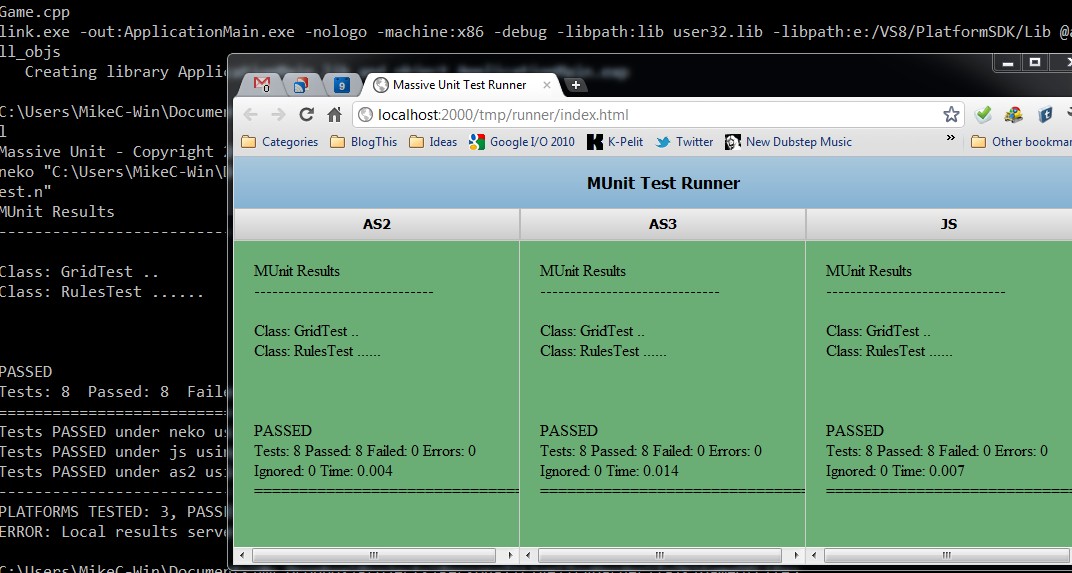
When executed you get something that looks like the following:


Which presents a nice graphical representation of the tests run and which failed (if any).

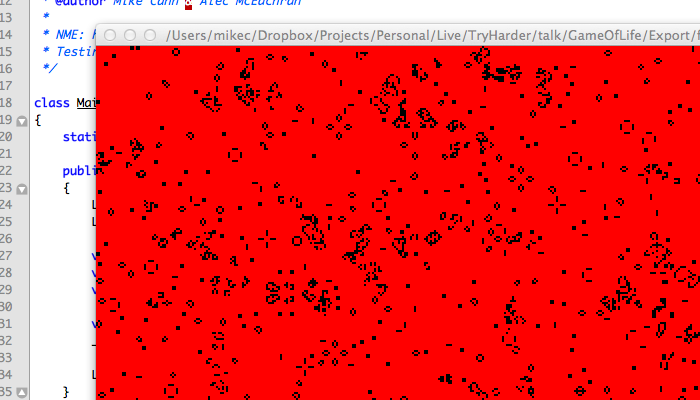
Once built and tested we decided to give the code a simple visual representation. We wanted to show off the ability for haXe to target multiple platforms. To do this we decided to go with NME which I had been experimenting around with recently.

NME is a library and tool chain for haXe designed to allow the developer to use the flash API on multiple platforms. They achieve this by writing platform targeted version of the flash API. So what this means is code such as the following:

[codesyntax lang="actionscript3" lines="no"]
package ;
import flash.display.Bitmap;
import flash.display.BitmapData;
import flash.display.MovieClip;
import flash.geom.Rectangle;

/**
* ...
* @author MikeC & Alec McEachran
*/

class Render
{

private var _cellSize : Int;
private var _renderTarget : BitmapData;
private var _rect:Rectangle;

public function new(container:MovieClip, cols:Int, rows:Int, cellSize:Int)
{
_cellSize = cellSize;
_renderTarget = new BitmapData(cols * cellSize, rows * cellSize, false);
container.addChild(new Bitmap(_renderTarget));

_rect = new Rectangle(0, 0, _cellSize, _cellSize);
}

public inline function lock():Void
{
_renderTarget.lock();
_renderTarget.fillRect(_renderTarget.rect, 0xff0000);
}

public inline function renderCell(x:Int, y:Int, isLive:Bool):Void
{
if (isLive)
{
_rect.x = x * _cellSize;
_rect.y = y * _cellSize;
_renderTarget.fillRect(_rect, 0);
}
}

public inline function unlock():Void
{
_renderTarget.unlock();
}

}

[/codesyntax]

Will compile down to flash, c++ and Javascript! NME also includes packaging abilities for webos, android and ios. So with a few scripted command lines you can target most app marketplaces:

[codesyntax lang="text"]
haxelib run nme test YourProject.nmml flash
haxelib run nme update YourProject.nmml ios
haxelib run nme test YourProject.nmml webos
haxelib run nme test YourProject.nmml android
haxelib run nme test YourProject.nmml cpp
haxelib run nme test YourProject.nmml cpp -64

[/codesyntax]

What it means for this project is we could very quickly get a view for our game of life running in flash, JS and native desktop.

To show just how easy it is I made the following video:


You can see the HTML5 build here: http://mikecann.co.uk/projects/gameoflife/Export/html5/bin/

And the flash build here: http://mikecann.co.uk/projects/gameoflife/Export/flash/bin/MyApplication.swf

I have uploaded the source for the project here: http://mikecann.co.uk/projects/gameoflife/gameoflife.zip

Saturday, 8 October 2011

try {harder} - my haXe slides and code


This week was a week of firsts. It was the first meeting for the try {harder} conference. It was the first flash conference I have ever attended and it was my first time speaking infront of a group of my peers on a topic I feel passionate about.

The idea behind the conference was to introduce a smaller (16 people), more intimate conference environment where the key was to learn and inspire. And in that goal it certainty succeeded.

The fact that everyone had to give a talk encouraged attentiveness and participation as you knew it was only a matter of time before you were in the same situation. It also reduced the stress that comes from speaking to so many very intelligent people.

When Stray contacted me to suggest that my talk's topic was to be on haXe I was very uncertain. I didn't feel like I had enough experience with haXe to confidently speak about it having only worked with it for less than a year. It turned out however to be a good thing, it pushed me to find out more about haXe, research some areas I had heard about but never investigated.

When constructing my slides I knew that I could never cover all of haXe as its such a large topic with so many interesting facets. I decided that I should probably concentrate on targeting the talk towards my target audience. That is very experienced Actionscript and Flex developers who probably had heard of haXe but never really had any impotence to pick it up and use it any more.

With that in mind I structured my slides around what I considered the big advantages of haXe over Actionscript or Javascript. I also knew that my audience are all very experienced programmers so I tried to give plenty of code samples and examples.

Anyways, at the end of the day I really enjoyed preparing and giving my first talk at try {harder}. It was well received and I just hope I have succeeded in inspiring some more people into investigating and using haXe.

I wrote my slides in google docs which are viewable online: https://docs.google.com/present/view?id=dc6wvdg5_151frv985w7

The code samples and examples mentioned on slides are uploaded here: http://mikecann.co.uk/projects/TryHarder.zip


Thursday, 11 August 2011

5,000,000 Chrome Crawlers? Why not [haXe & WebGL]


Following on from my previous experiments into the world of haXe and HTML5 I have been playing around again with trying to get as many 2D sprites on screen as I can.

I started by reading some posts by google on how to render things fast in HTML5, and it got me thinking. Where I was likely going wrong with my HaXe + Three.js experiments was that I was making a separate draw call to WebGL for each and every crawler. Draw calls are expensive and hence I was reaching the draw call bottleneck at just 2000 sprites being rendered at once.

What I needed to do was batch the draw calls together and render them at once. I knew from my work on XNA you could group sprite render calls together quite nicely. So I started off coding up a WebGL equivillant of SpriteBatch from XNA.  I managed to get it kind-of working but as is often the way another thought struck my brain, and I decided to tackle that instead.

My thought was; why not just render everything as 2D point sprites? I remembered from my XNA days you could achieve quite staggering numbers of 2D sprites in DirectX by using point spites.

So after a little bit of fiddling and hacking I managed to get point sprites correctly rendering:


You can play with it here: http://mikecann.co.uk/projects/HTML5SpeedTests/HaXeWebGL/bin/

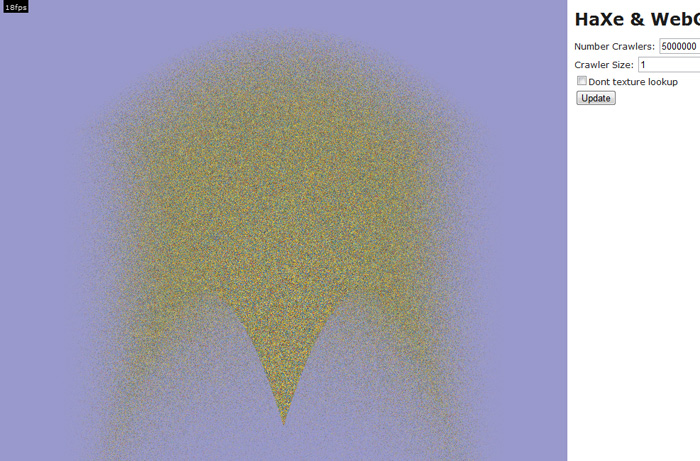
The great thing about point sprites is that I only use one draw call per frame and the GPU is very good at rendering them. The only bottleneck really is the number of pixels you need to draw. With that in mind if you drop the size of the point sprite down to 1x1 you can render a very large (5million) points at interactive framerates (18fps):


I added a "dont use texture" option just out of interest to see how expensive the texture lookup in the fragment shader was, it didnt seem have much of an effect.

There are a few caveats to using point sprites:

Firstly in WebGL has a limit on how large you can make them currently it differs between graphics cards and browsers, a safe minimum is 64x64 so this means you cant have them and bigger and still want it to work in all situations.

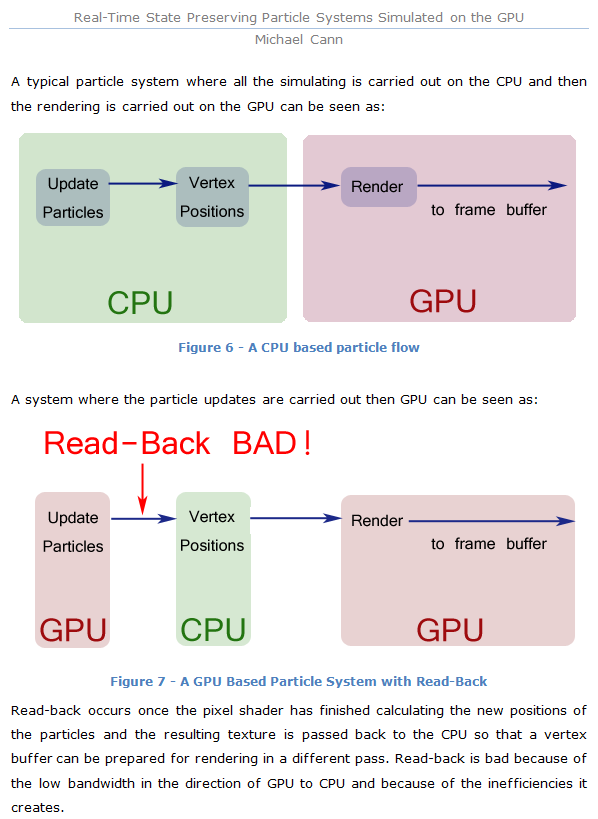
Secondly, and this one is more important I cheated to get the numbers above. In my other experiments with haXe and WebGL I was using the CPU to update the positions of the crawlers each frame, having them bounce off the screen edges. In this point sprites demo however I have the points flowing out of a fountain, the simulation of which is entirely calculated on the GPU. The reason for this I talked about in a paper I wrote for a university project 4 years ago:


If I wasn't to perform the upates on the GPU but instead just use the CPU to update the crawlers that would mean the javascript (CPU) would need to update 5million crawlers each frame then re-upload the point sprite positions back to the GPU for rendering. This would obviously be a bad idea.

So I kind of cheated. The fountain simulation on the GPU isn't the same as my other examples. The crawlers don't bounce off the side of the screen. To make that that happen each crawler needs to somehow preserve its state between frames.

Currently each crawler's position is calculated in the vertex shader each frame like so:

[codesyntax lang="glsl"]
attribute float maxAge;
attribute float startingAge;
attribute float velX;
attribute float velY;

uniform float uTime;
uniform float uPointSize;

varying float invAgeRatioSq;

void main(void)
{
float age = mod(uTime+startingAge, maxAge);
float ageRatio = age / maxAge;
float invAge = 1.0 - ageRatio;
invAgeRatioSq = 1.0 - (ageRatio * ageRatio);

gl_Position = vec4((-velX*ageRatio*0.8), (velY*ageRatio)+(-0.4*age*ageRatio)-0.5, 0., 1.);

gl_PointSize = uPointSize;
}

[/codesyntax]

To preserve state between frames I need to use textures to record each crawlers position and velocity, then using Vertex Texture Fetch a vertices position can be calculated.

That however will have to wait for another evening ;)

I have uploaded the source for this project here incase anyone was interested:

http://mikecann.co.uk/projects/HTML5SpeedTests/HTML5SpeedTests_2.zip

I warn you its ugly and uncommented, however it should be enough of a start for anyone looking to do something similar.

Sunday, 10 July 2011

More HTML5 & HaXe Speed Tests


Ive spent a little more time this weekend looking at some more  HTML5 with HaXe. Following on from my previous experiments with WebGL I decided to give HTML5's Canvas a a look as it was supposed to be designed specifically for the purpose of doing 2D.

I had heard from the HaXe mailing list that the Jeash project was a common way of interacting with the canvas in HaXe. Jeash is a remapping of the Flash API into JS so in effect I should beable to take any of my usual flash code, Sprite's,  BitmapData's, etc and it should run on the canvas no problems. Nice!

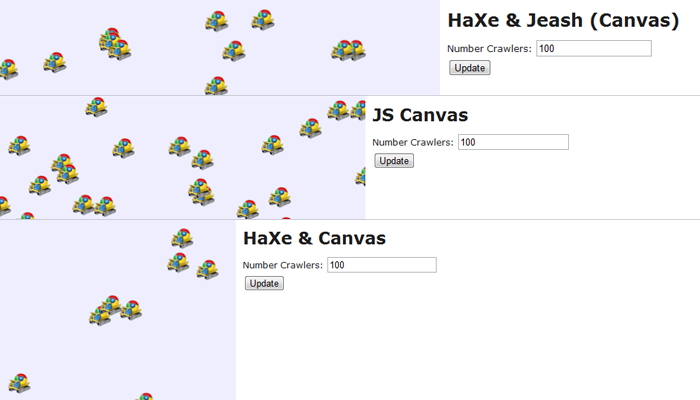
So I coded up a quick blitting example to see what sort of performance I would get:

http://mikecann.co.uk/projects/HTML5SpeedTests/HaXeJeash/bin/

The results were okay (I get about 11FPS with 5,000 crawlers) however I was interested to know what sort of cost HaXe adds. So I decided to code up a second example, this time using pure JS:

http://mikecann.co.uk/projects/HTML5SpeedTests/JSCanvas/

The results this time were better (14FPS with 5,000 crawlers) so I now wondered what happens if I do without Jeash and just code up the example using pure HaXe. I was expecting to see the same sort of performance hit as Jeash:

http://mikecann.co.uk/projects/HTML5SpeedTests/HaXeCanvas/bin/

Surprisingly it actually runs faster (17FPS with 5,000 crawlers) ! This is quite a surprise and totally contradicts my notion that going from HaXe -> JS would incur a cost. I was expecting some cost, but a performance increase?! I can only speculate that behind the scenes the JS engine in the browser is able to JIT compile the HaXe JS much better than the hand-crafted JS and hence more speed.

If you are interested in the source then I have uploaded it here: http://mikecann.co.uk/projects/HTML5SpeedTests/HTML5SpeedTests_1.zip

P.S. All the test were run on Windows 7 x64 in Chrome 14 (dev)

Sunday, 12 June 2011

Chrome Crawler, HaXe, Three.js, WebGL and 2D Sprites


Had a little free time this weekend so thought I would scratch an itch that has been bugging me for a while.

I started the second version of my Chrome Crawler extension a little while back. I have been using the language HaXe to develop it in. It's a great language and I wanted to explore its JS target a little more so I thought, why not make a chrome extension using it. I have had several emails from various people requesting features for Chrome Crawler so I thought I would extend the extension and rewrite it in HaXe at the same time.

I managed to get the basics of the crawler working a few months back but through lack of time got no further. The second thing I wanted to work on after the basic crawling code was how to represent the crawled data. The current method is simply as a list:


A while back however I recieved a mail from "" who sent me a link to a video he had made using Chrome Crawler and Gephi:


As you can see its pretty cool, visually graphed out as a big node tree.

So it got me thinking, can I replicate this directly in Chrome Crawler? To do this I would need to be able to render thousands of nodes and hopefully have them all moving about in a spring like manner determined by the relationships of the crawled pages.

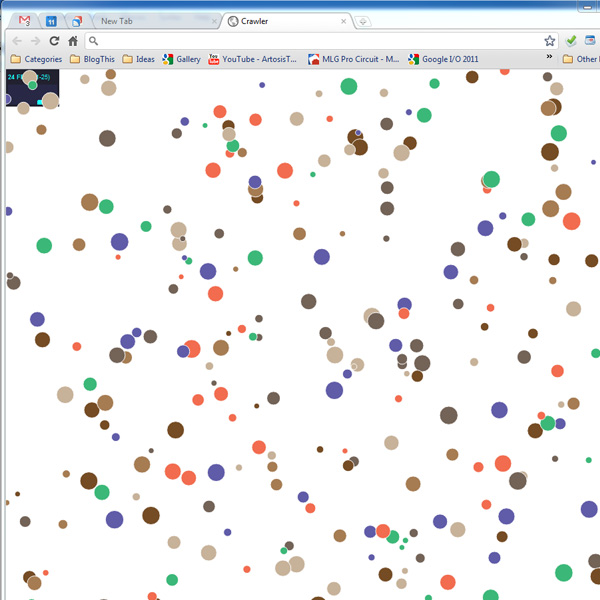
The first thing I tried was using the HaXe version of the Raphael library. The library is designed for graphing and uses the Canvas with SVG for rendering, so I thought it would be perfect for replicating Gephi. I tested it however and only managed about 300 circles moving and updating at 25FPS:


300 nodes just wasnt going to cut it, I needed more.

Enter the recent HaXe externs for Three.js and its WebGL renderer. Three.js is rapidly becoming the defacto 3D engine for Javascript and takes alot of the headaches away from setting up and rendering to WebGL.

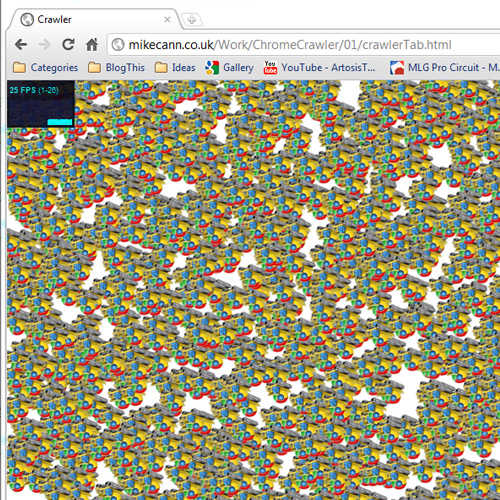
After a little jiggery pokery with the still very new externs I managed to get something running:


Thats 2000 sprites running at 25fps which is less that I would have hoped for WebGL but still probably enough for ChromeCrawler. Im not too sure why the sprites are upside-down, nothing I can do seems to right them, perhaps someone can suggest the solution?

If you have a compatible browser you can check it out here. I have also uploaded the source to its own project if you are interested.

The next step is to take the data from the crawl and then render it as a node graph, exiting stuff!

Monday, 11 April 2011

URI Parser For HaXe

Continuing on my theme of the moment haXe, I have another post  regarding the development of my haXe rewrite of  ChromeCrawler.

I was in need of a way to split a URL into its various parts. To do this in previous versions of ChromeCrawler I used a ready built one I found on the web.

I thought it should be a fairly simple matter to port this to haXe, unfortunately however this wasn't the case. The problem was that haXe, unlike JS, doesnt have the exec() method on its regular expression function. What this meant is that the URL couldnt be split in the same way.

Confused I jumped on the haXe IRC, unfortunately the solutions the kind people there provided didnt work. Instead I posted a message on the mailing list and within a few hours I had my answer. The solution was to use EReg.match() then EReg.matched() to get each part.

Anyways, I promised to share the code when I was done so here it is:

[codesyntax lang="javascript"]
package utils;
import haxe.Http;

/**
* ...
* @author mikecann.co.uk
*/

class URLParser
{
// Publics
public var url : String;
public var source : String;
public var protocol : String;
public var authority : String;
public var userInfo : String;
public var user : String;
public var password : String;
public var host : String;
public var port : String;
public var relative : String;
public var path : String;
public var directory : String;
public var file : String;
public var query : String;
public var anchor : String;

// Privates
inline static private var _parts : Array<String> = ["source","protocol","authority","userInfo","user","password","host","port","relative","path","directory","file","query","anchor"];

public function new(url:String)
{
// Save for 'ron
this.url = url;

// The almighty regexp (courtesy of http://blog.stevenlevithan.com/archives/parseuri)
var r : EReg = ~/^(?:(?![^:@]+:[^:@\/]*@)([^:\/?#.]+):)?(?:\/\/)?((?:(([^:@]*)(?::([^:@]*))?)?@)?([^:\/?#]*)(?::(\d*))?)(((\/(?:[^?#](?![^?#\/]*\.[^?#\/.]+(?:[?#]|$)))*\/?)?([^?#\/]*))(?:\?([^#]*))?(?:#(.*))?)/;

// Match the regexp to the url
r.match(url);

// Use reflection to set each part
for (i in 0..._parts.length)
{
Reflect.setField(this, _parts[i], r.matched(i));
}
}

public function toString() : String
{
var s : String = "For Url -> " + url + "\n";
for (i in 0..._parts.length)
{
s += _parts[i] + ": " + Reflect.field(this, _parts[i]) + (i==_parts.length-1?"":"\n");
}
return s;
}

public static function parse(url:String) : URLParser
{
return new URLParser(url);
}
}

[/codesyntax]

So for example the following use:

[codesyntax lang="javascript"]
trace(new URLParser("http://www.mikecann.co.uk/programming/haxe/haxe-jqueryextern-gotcha?somevar=1242#home"));

[/codesyntax]

Will print the following:

[codesyntax lang="text"]
For Url -> http://www.mikecann.co.uk/programming/haxe/haxe-jqueryextern-gotcha?somevar=1242#home
source: http://www.mikecann.co.uk/programming/haxe/haxe-jqueryextern-gotcha?somevar=1242#home
protocol: http
authority: www.mikecann.co.uk
userInfo: undefined
user: undefined
password: undefined
host: www.mikecann.co.uk
port: undefined
relative: /programming/haxe/haxe-jqueryextern-gotcha?somevar=1242#home
path: /programming/haxe/haxe-jqueryextern-gotcha
directory: /programming/haxe/haxe-jqueryextern-gotcha
file:
query: somevar=1242
anchor: home

[/codesyntax]

Simples!

Im not sure how performant the reflection usage would be on the various platforms haXe targets but atleast it would work and its fairly elegant to boot ;)

Edit: Thank you Adrian Cowen for posting this as a haXe snippet: http://haxe.org/doc/snip/uri_parser

Sunday, 10 April 2011

HaXe & jQueryExtern Gotcha


As some of you may know, I have been getting into haXe reccently. For those of you dont know what haXe is, this is taken from haxe.org:
haXe (pronounced as hex) is an open source programming language

While most other languages are bound to their own platform (Java to the JVM, C# to .Net, ActionScript to the Flash Player), haXe is a multiplatform language.

I have been aware of haXe for a long time, infact I used to make extensive use of precursor to haXe, MTASC the alternative compiler for AS2. Since the launch of AS3 however, Nicolas Cannasse of Motion-Twin has moved onto HaXe, and the project has flourished.

I have used HaXe in the past for various small projects, usually to take advantage of some of the features that the language offers Flash developers that AS3 cant offer us. Features such as function inlining and the fast memory ops mean that flash developers can really get some great performance out of their libraries while at the same time still able to compile to SWC's.

Recently I have been exploring the various other targets offered by haXe, not just the flash one. Currently haXe supports the following targets:
Javascript : You can compile a haXe program to a single .js file. You can access the typed browser DOM APIs with autocompletion support, and all the dependencies will be resolved at compilation time.

Flash : You can compile a haXe program to a .swf file. haXe is compatible with Flash Players 6 to 10, with either "old" Flash 8 API or newest AS3/Flash9+ API. haXe offers very good performance and language features to develop Flash content.

NekoVM : You can compile a haXe program to NekoVM bytecode. This can be used for server-side programming such as dynamic webpages (using mod_neko for Apache) and also for command-line or desktop applications, since NekoVM can be embedded and extended with some other DLL.

PHP : You can compile a haXe program to .php files. This will enable you to use a high level strictly-typed language such as haXe while keeping full compatibility with your existing server platform and libraries.

C++ : You can now generate C++ code from your haXe source code, with the required Makefiles. This is very useful for creating native applications, for instance in iPhone development.

C# and Java targets are coming soon! (from @cwaneck)

The target that has taken my interest recently has been Javascript.

Having recently worked in Javascript on my Chrome extensions PostToTumblr and ChromeCrawler I have gained a better understanding of how JS works and how to code in it. Despite this however I still cant get over what I consider some "very nasty" things in the language. Lack of type safety, nested anonymous functions and lack of proper classes just have my stomach all in knots thinking about them.

So I was extremely happy to discover that haXe now targets Javascript. It meant I could write the next version of ChromeCrawler in type-safe, class-happy haxe and it would simply hide all the nastyness from me once it compiles. (You can ofcourse modify the JS that is exported if you so wish however)

So now, finally to the point of this post. I sat down to write the core functionality of the crawler. To do the URL crawling so far I had been using jQuery's get() method to load an external page.

How was I to use the jQuery library in haXe I wondered. Well thankfully this has already been thought of with the special "extern" keyword: http://haxe.org/doc/js/extern_libraries

Thankfully Andy Li has also already provided an excellent version of the library for haXe in his jQueryExtern project. Using the haxelib command I downloaded the project and started coding.

It wasnt long however before I ran into a compilation issue when I tried to use the static function get() on the JQueryS class:
characters 2-9 : Unknown identifier : JQueryS

This confused me as no matter what I did, I couldn't get the haXe compiler to recognise the class. Having spent an evening stuck on the problem I decided to email the creator of the project Andy Li.

It turns out that to beable to use the JQueryS class you must first import the JQuery class:
import JQuery;

Low and behold that worked!

As I couldn't find the solution to this problem on a Google search I thought I would write up the solution myself so that others don't stumble on this rather singular gotcha.