Showing posts with label compile. Show all posts

Sunday, 10 April 2011

HaXe & jQueryExtern Gotcha


As some of you may know, I have been getting into haXe reccently. For those of you dont know what haXe is, this is taken from haxe.org:
haXe (pronounced as hex) is an open source programming language

While most other languages are bound to their own platform (Java to the JVM, C# to .Net, ActionScript to the Flash Player), haXe is a multiplatform language.

I have been aware of haXe for a long time, infact I used to make extensive use of precursor to haXe, MTASC the alternative compiler for AS2. Since the launch of AS3 however, Nicolas Cannasse of Motion-Twin has moved onto HaXe, and the project has flourished.

I have used HaXe in the past for various small projects, usually to take advantage of some of the features that the language offers Flash developers that AS3 cant offer us. Features such as function inlining and the fast memory ops mean that flash developers can really get some great performance out of their libraries while at the same time still able to compile to SWC's.

Recently I have been exploring the various other targets offered by haXe, not just the flash one. Currently haXe supports the following targets:
Javascript : You can compile a haXe program to a single .js file. You can access the typed browser DOM APIs with autocompletion support, and all the dependencies will be resolved at compilation time.

Flash : You can compile a haXe program to a .swf file. haXe is compatible with Flash Players 6 to 10, with either "old" Flash 8 API or newest AS3/Flash9+ API. haXe offers very good performance and language features to develop Flash content.

NekoVM : You can compile a haXe program to NekoVM bytecode. This can be used for server-side programming such as dynamic webpages (using mod_neko for Apache) and also for command-line or desktop applications, since NekoVM can be embedded and extended with some other DLL.

PHP : You can compile a haXe program to .php files. This will enable you to use a high level strictly-typed language such as haXe while keeping full compatibility with your existing server platform and libraries.

C++ : You can now generate C++ code from your haXe source code, with the required Makefiles. This is very useful for creating native applications, for instance in iPhone development.

C# and Java targets are coming soon! (from @cwaneck)

The target that has taken my interest recently has been Javascript.

Having recently worked in Javascript on my Chrome extensions PostToTumblr and ChromeCrawler I have gained a better understanding of how JS works and how to code in it. Despite this however I still cant get over what I consider some "very nasty" things in the language. Lack of type safety, nested anonymous functions and lack of proper classes just have my stomach all in knots thinking about them.

So I was extremely happy to discover that haXe now targets Javascript. It meant I could write the next version of ChromeCrawler in type-safe, class-happy haxe and it would simply hide all the nastyness from me once it compiles. (You can ofcourse modify the JS that is exported if you so wish however)

So now, finally to the point of this post. I sat down to write the core functionality of the crawler. To do the URL crawling so far I had been using jQuery's get() method to load an external page.

How was I to use the jQuery library in haXe I wondered. Well thankfully this has already been thought of with the special "extern" keyword: http://haxe.org/doc/js/extern_libraries

Thankfully Andy Li has also already provided an excellent version of the library for haXe in his jQueryExtern project. Using the haxelib command I downloaded the project and started coding.

It wasnt long however before I ran into a compilation issue when I tried to use the static function get() on the JQueryS class:
characters 2-9 : Unknown identifier : JQueryS

This confused me as no matter what I did, I couldn't get the haXe compiler to recognise the class. Having spent an evening stuck on the problem I decided to email the creator of the project Andy Li.

It turns out that to beable to use the JQueryS class you must first import the JQuery class:
import JQuery;

Low and behold that worked!

As I couldn't find the solution to this problem on a Google search I thought I would write up the solution myself so that others don't stumble on this rather singular gotcha.


Tuesday, 8 February 2011

1046: Type was not found or was not a compile-time constant


Came across this little oddity the other day. Took me ages to work out what was going on, so thought I would share in case anyone else ran into the same issue.

One day, for a reason I couldn't fathom, my project stopped compiling. I kept getting these odd "1046: Type was not found or was not a compile-time constant" errors all over the place. Not only that, when I tried to include the class in question either via auto-complete (control & space) or via manual import the error persisted.

To cut a long story short it seems that if you try to new a member property that is of type Class from another class and the constructor takes in at least one parameter the error will occur.

So for example take the two following classes:

[codesyntax lang="actionscript3"]
package package2
{
import package1.MyTestClass;

public class MyTestClass2
{
public var type : Class = MyTestClass;
}
}

[/codesyntax]

And

[codesyntax lang="actionscript"]
package package1
{
public class MyTestClass
{
public function MyTestClass(someVar:String)
{
trace(someVar);
}
}
}

[/codesyntax]

Now try using them in the following fashion:

[codesyntax lang="mxml"]
<?xml version="1.0" encoding="utf-8"?>
<s:Application xmlns:fx="http://ns.adobe.com/mxml/2009"
xmlns:s="library://ns.adobe.com/flex/spark"
xmlns:mx="library://ns.adobe.com/flex/mx" creationComplete="application1_creationCompleteHandler(event)">

<fx:Script>
<![CDATA[
import mx.events.FlexEvent;

protected function application1_creationCompleteHandler(event:FlexEvent):void
{
var class2 : MyTestClass2 = new MyTestClass2();
var class1 : MyTestClass = new (class2.type)("hello");
}

]]>
</fx:Script>

</s:Application>

[/codesyntax]

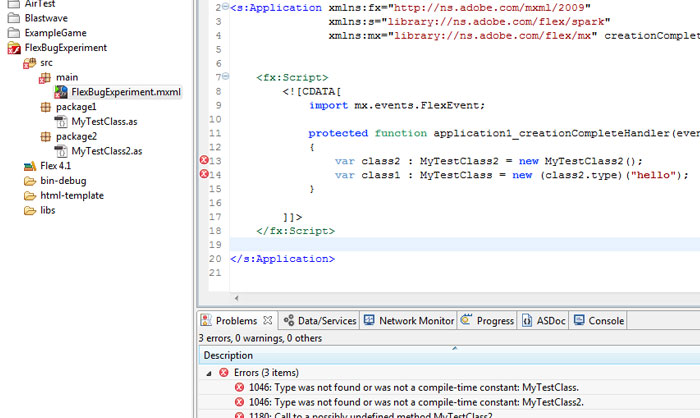
And uh oh, bad times:

[codesyntax lang="php"]
1046: Type was not found or was not a compile-time constant: MyTestClass.	FlexBugExperiment.mxml	/FlexBugExperiment/src/main	line 14	Flex Problem

1046: Type was not found or was not a compile-time constant: MyTestClass2. FlexBugExperiment.mxml /FlexBugExperiment/src/main line 13 Flex Problem

1180: Call to a possibly undefined method MyTestClass2. FlexBugExperiment.mxml /FlexBugExperiment/src/main line 13 Flex Problem

[/codesyntax]

The bad line is:

[codesyntax lang="actionscript"]
var class1 : MyTestClass = new (class2.type)("hello");

[/codesyntax]

If you take away the "hello" part or you split it out into two lines like so:

[codesyntax lang="actionscript"]
var tmpC : Class = (class2.type);
var class1 : MyTestClass = new tmpC("hello");

[/codesyntax]

Then everything is gravy

Anyway, I hope this helped someone out!