Showing posts with label MXML. Show all posts

Thursday, 17 February 2011

Flex Binding & Compile Times


Binding in flex has been playing on my mind for a little while now, so I have decided to finally sit down and try to resolve the issue.

The worry has been that on large projects that make heave use of the flex automatic binding, compile times could be dramatically increased. This is because behind the scenes the flex compiler must convert those syntax sugar ([Bindable] and {}) into actual AS3 code. The exact way this is done I wont go into, but I recommend you google it, its a fascinating topic.

I really like the ease of use of automatic binding but at the same time I was worried about how much slower compile times are because of them. So I decided I would try to run some tests and see.

To compare the compile time performance of binding I ran three tests. The first, a control to define how long compilation takes with an empty Flex Application. The second tests how long non-binding takes and is comprised of a single group with 4000 labels that are assigned values. The third test is for binding and is 4000 labels that are bound to 4000 [Bindable] public variables.

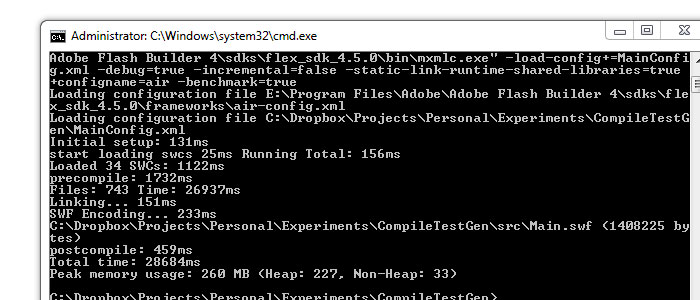
For testing metrics I used the -benchmark=true compile flag along with -incremental=false to stop any sort of compile-caching. The full command line compile looks like:
"E:\Program Files\Adobe\Adobe Flash Builder 4\sdks\flex_sdk_4.5.0\bin\mxmlc.exe" -load-config+=MainConfig.xml -debug=true -incremental=false -static-link-runtime-shared-libraries=true +configname=air -benchmark=true

I ran each test three times and took the average of each. I then ran the entire thing again but with -debug=false to see if that would make any difference.

I recorded all the results in this google doc: https://spreadsheets.google.com/ccc?key=0AoHeesrTENc9dEFqamdCc2ZldHcyZkJmQkZsaDBOT0E&hl=en&authkey=CLP8r-MF

The general gist is that it seems binding adds about 20% onto compile times both- debug=true and -debug=false. This isnt as bad as I was fearing but still a 20% increase on a 30 second compile time can be annoying.

Im not sure if the tests I did were fair so I would love to hear feedback from others.

I have bundled the project up incase anyone wanted to test it themselves: http://mikecann.co.uk/wp-content/uploads/2011/02/CompileTestGen.zip

Tuesday, 8 February 2011

1046: Type was not found or was not a compile-time constant


Came across this little oddity the other day. Took me ages to work out what was going on, so thought I would share in case anyone else ran into the same issue.

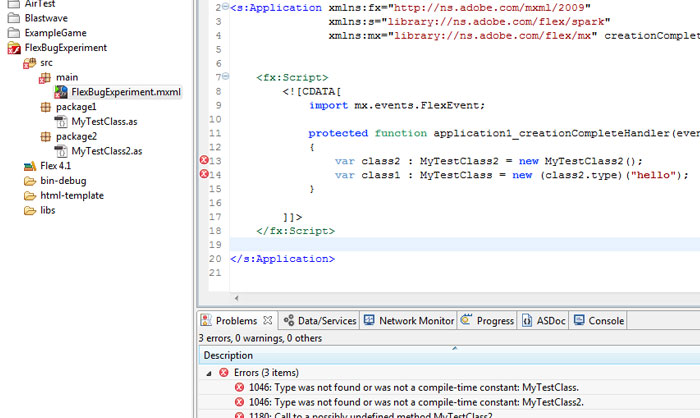
One day, for a reason I couldn't fathom, my project stopped compiling. I kept getting these odd "1046: Type was not found or was not a compile-time constant" errors all over the place. Not only that, when I tried to include the class in question either via auto-complete (control & space) or via manual import the error persisted.

To cut a long story short it seems that if you try to new a member property that is of type Class from another class and the constructor takes in at least one parameter the error will occur.

So for example take the two following classes:

[codesyntax lang="actionscript3"]
package package2
{
import package1.MyTestClass;

public class MyTestClass2
{
public var type : Class = MyTestClass;
}
}

[/codesyntax]

And

[codesyntax lang="actionscript"]
package package1
{
public class MyTestClass
{
public function MyTestClass(someVar:String)
{
trace(someVar);
}
}
}

[/codesyntax]

Now try using them in the following fashion:

[codesyntax lang="mxml"]
<?xml version="1.0" encoding="utf-8"?>
<s:Application xmlns:fx="http://ns.adobe.com/mxml/2009"
xmlns:s="library://ns.adobe.com/flex/spark"
xmlns:mx="library://ns.adobe.com/flex/mx" creationComplete="application1_creationCompleteHandler(event)">

<fx:Script>
<![CDATA[
import mx.events.FlexEvent;

protected function application1_creationCompleteHandler(event:FlexEvent):void
{
var class2 : MyTestClass2 = new MyTestClass2();
var class1 : MyTestClass = new (class2.type)("hello");
}

]]>
</fx:Script>

</s:Application>

[/codesyntax]

And uh oh, bad times:

[codesyntax lang="php"]
1046: Type was not found or was not a compile-time constant: MyTestClass.	FlexBugExperiment.mxml	/FlexBugExperiment/src/main	line 14	Flex Problem

1046: Type was not found or was not a compile-time constant: MyTestClass2. FlexBugExperiment.mxml /FlexBugExperiment/src/main line 13 Flex Problem

1180: Call to a possibly undefined method MyTestClass2. FlexBugExperiment.mxml /FlexBugExperiment/src/main line 13 Flex Problem

[/codesyntax]

The bad line is:

[codesyntax lang="actionscript"]
var class1 : MyTestClass = new (class2.type)("hello");

[/codesyntax]

If you take away the "hello" part or you split it out into two lines like so:

[codesyntax lang="actionscript"]
var tmpC : Class = (class2.type);
var class1 : MyTestClass = new tmpC("hello");

[/codesyntax]

Then everything is gravy

Anyway, I hope this helped someone out!

Sunday, 28 November 2010

Multi-Line Flex Label [MXML]

Just stumbled across this one while writing some mxml for a personal project and thought I would share.

Have you ever wanted to have multi-line text in your label component in spark and thought the following should work?

[codesyntax lang="mxml"]
<s:Label text="I like text on the \n next line" />

[/codesyntax]

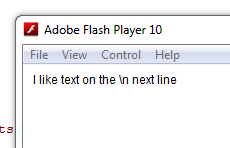
But all it produces is:


Yep me too.

After some playing however I stumbled accross the following solution:

[codesyntax lang="mxml"]
<s:Label text="I like text on the {'\n'} next line" />

[/codesyntax]

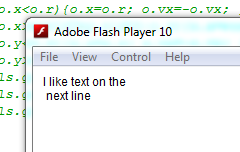
It then produces the expected result:


Im just guessing but I suspect its something to do with the black art of the flex life cycle. By adding the {'\n'} we are turning the property initialisation on the label component from a simple literal assignment into a delayed binding assignment and therefore gets parsed differently.

Just a guess, let me know if im way off.

Monday, 2 August 2010

Flex 4 Spark & Rollover Group Containing Rect

Was working on my top-secret Flex-based project over the weekend when I discovered something I hadn't come across before.

The issue is that when you have a Spark Rect GraphicsElement within a Spark Group it seems that the rollover event of the group is triggered even though the mouse doesn't roll over the Rect.

Here is a video I made to explain my issue on Twitter:


The code in the video is as follows:

[codesyntax lang="mxml"]
<s:WindowedApplication xmlns:fx="http://ns.adobe.com/mxml/2009"
xmlns:s="library://ns.adobe.com/flex/spark"
xmlns:mx="library://ns.adobe.com/flex/mx">

<s:Group rollOver="trace('ya')">
<s:Rect x="100" y="100" width="20" height="20">
<s:fill>
<s:SolidColor color="0x00ff00" />
</s:fill>
</s:Rect>
</s:Group>

</s:WindowedApplication>

[/codesyntax]

It turns out (after posting the issue on the Adobe Forums) that I was simply missing the "mouseEnabledWhereTransparent" property on the Group. Setting it to false causes the mouse to perform a hit-test rather than a simple bounds check. Thank you Mr Shongrunden for pointing this out to me :)

So this now works:

[codesyntax lang="php"]
<s:WindowedApplication xmlns:fx="http://ns.adobe.com/mxml/2009"
xmlns:s="library://ns.adobe.com/flex/spark"
xmlns:mx="library://ns.adobe.com/flex/mx">

<s:Group rollOver="trace('ya')" mouseEnabledWhereTransparent="false">
<s:Rect x="100" y="100" width="20" height="20">
<s:fill>
<s:SolidColor color="0x00ff00" />
</s:fill>
</s:Rect>
</s:Group>

</s:WindowedApplication>

[/codesyntax]

I hope this helps someone else out!

Thursday, 4 March 2010

Trance Around The World, Show Downloader

Had this little idea a while back, thought I would spend an hour tonight and bash it out.

I love the Trance Around The World radio show by Above and Beyond, downloading  it for listening later is very annoying however and involves some fiddling with browser source and other things, so to make life easier I built this little tool. What it does is grab the HTML from the above and beyond page then parse it for the MP3 file, then it uses the FileReference class in flash to download it to your HD.

Anyways, enough jibber jabber. Source is enabled:

[airbadge]TATW Downloader,http://www.mikecann.co.uk/wp-content/uploads/2010/03/TATWDownloaderAir.air,1,http://mikecann.co.uk/wp-content/uploads/2010/03/ScreenHunter_01-Mar.-04-23.45.gif[/airbadge]

Hope you enjoy!

Sunday, 21 February 2010

Resizeable Chromeless Window AIR

Thought I would share this little ditty. Been working in AIR recently and decided to make the window "chromeless" which means there are no controls so no resizing.

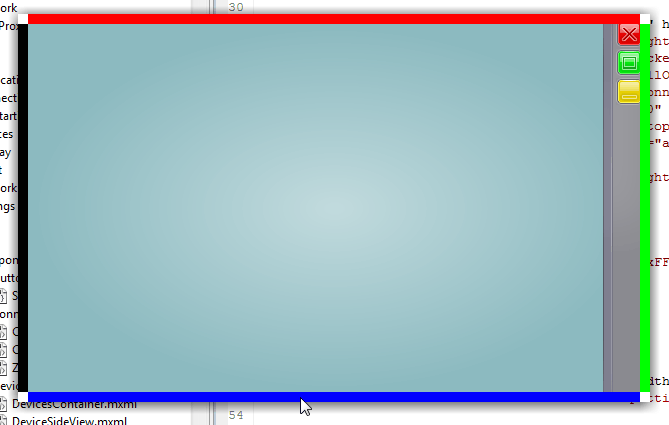
Thankfully however adobe provide the tools to allow for resizing the native window. So I produced this little mxml component to let you resize the window:


The coloured edges indicate where the application is draggable, including the white corner areas.

The component that lets you do this is pretty simple:

[codesyntax lang="mxml"]
<?xml version="1.0" encoding="utf-8"?>
<s:Group xmlns:fx="http://ns.adobe.com/mxml/2009"
xmlns:s="library://ns.adobe.com/flex/spark"
xmlns:mx="library://ns.adobe.com/flex/halo">

<fx:Script>
<![CDATA[
import flash.display.NativeWindowResize;
import flash.events.MouseEvent;

import mx.managers.CursorManager;
public static const RESIZE_AREA : int = 10;

protected function onRollOver(event:MouseEvent):void
{
}

protected function onRollOut(event:MouseEvent):void
{
}

protected function onMouseDown(event:MouseEvent):void
{
var grp : Group = event.target as Group;
var resizeFrom:String = "";

if (grp==topSide){ resizeFrom=NativeWindowResize.TOP; }
else if (grp==rightSide) { resizeFrom=NativeWindowResize.RIGHT; }
else if (grp==bottomSide) { resizeFrom=NativeWindowResize.BOTTOM; }
else if (grp==leftSide) { resizeFrom=NativeWindowResize.LEFT; }
else if (grp==topLeft) { resizeFrom=NativeWindowResize.TOP_LEFT; }
else if (grp==topRight) { resizeFrom=NativeWindowResize.TOP_RIGHT; }
else if (grp==bottomRight) { resizeFrom=NativeWindowResize.BOTTOM_RIGHT; }
else if (grp==bottomLeft) { resizeFrom=NativeWindowResize.BOTTOM_LEFT; }
else { return; }

stage.nativeWindow.startResize(resizeFrom);
}

]]>
</fx:Script>

<s:Group id="topSide" rollOver="onRollOver(event)" rollOut="onRollOut(event)" mouseDown="onMouseDown(event)"
x="0" y="0" width="{width}" height="{RESIZE_AREA}">
<s:Rect width="100%" height="100%">
<s:fill>
<s:SolidColor color="0xFF0000" />
</s:fill>
</s:Rect>
</s:Group>

<s:Group id="rightSide" rollOver="onRollOver(event)" rollOut="onRollOut(event)" mouseDown="onMouseDown(event)"
x="{width-RESIZE_AREA}" y="0" width="{RESIZE_AREA}" height="{height}">
<s:Rect width="100%" height="100%">
<s:fill>
<s:SolidColor color="0x00FF00" />
</s:fill>
</s:Rect>
</s:Group>

<s:Group id="bottomSide" rollOver="onRollOver(event)" rollOut="onRollOut(event)" mouseDown="onMouseDown(event)"
x="0" y="{height-RESIZE_AREA}" width="{width}" height="{RESIZE_AREA}">
<s:Rect width="100%" height="100%">
<s:fill>
<s:SolidColor color="0x0000FF" />
</s:fill>
</s:Rect>
</s:Group>

<s:Group id="leftSide" rollOver="onRollOver(event)" rollOut="onRollOut(event)" mouseDown="onMouseDown(event)"
x="0" y="0" width="{RESIZE_AREA}" height="{height}">
<s:Rect width="100%" height="100%">
<s:fill>
<s:SolidColor color="0x000000" />
</s:fill>
</s:Rect>
</s:Group>

<s:Group id="topLeft" rollOver="onRollOver(event)" rollOut="onRollOut(event)" mouseDown="onMouseDown(event)"
x="0" y="0" width="{RESIZE_AREA}" height="{RESIZE_AREA}">
<s:Rect width="100%" height="100%">
<s:fill>
<s:SolidColor color="0xffffff" />
</s:fill>
</s:Rect>
</s:Group>

<s:Group id="topRight" rollOver="onRollOver(event)" rollOut="onRollOut(event)" mouseDown="onMouseDown(event)"
x="{width-RESIZE_AREA}" y="0" width="{RESIZE_AREA}" height="{RESIZE_AREA}">
<s:Rect width="100%" height="100%">
<s:fill>
<s:SolidColor color="0xffffff" />
</s:fill>
</s:Rect>
</s:Group>

<s:Group id="bottomRight" rollOver="onRollOver(event)" rollOut="onRollOut(event)" mouseDown="onMouseDown(event)"
x="{width-RESIZE_AREA}" y="{height-RESIZE_AREA}" width="{RESIZE_AREA}" height="{RESIZE_AREA}">
<s:Rect width="100%" height="100%">
<s:fill>
<s:SolidColor color="0xffffff" />
</s:fill>
</s:Rect>
</s:Group>

<s:Group id="bottomLeft" rollOver="onRollOver(event)" rollOut="onRollOut(event)" mouseDown="onMouseDown(event)"
x="0" y="{height-RESIZE_AREA}" width="{RESIZE_AREA}" height="{RESIZE_AREA}">
<s:Rect width="100%" height="100%">
<s:fill>
<s:SolidColor color="0xffffff" />
</s:fill>
</s:Rect>
</s:Group>

</s:Group>

[/codesyntax]

To use it in your app just add the component into your existing view somewhere:

[codesyntax lang="mxml"]
<?xml version="1.0" encoding="utf-8"?>
<s:SkinnableContainer xmlns:fx="http://ns.adobe.com/mxml/2009" xmlns:s="library://ns.adobe.com/flex/spark" xmlns:mx="library://ns.adobe.com/flex/halo">

<components:WindowResizer width="{width}" height="{height}" alpha="0" buttonMode="true" />

</s:SkinnableContainer>

[/codesyntax]

Setting the alpha to zero will obviously hide the coloured areas at the side of the window.

Grab the mxml here: WindowResizer.mxml