.. and we have progress! See above. Use the keyboard to control the 'player'.
The first thing you will noticed is that there is a world populated with solid blocks and some orange circle things that may look a little like collectables :P To generate this level I decided to take a page out of Notch's book and build the levels at the pixel level in Paint.NET. That way the image editing software becomes the level editor. So as an example, the data that builds the level for above looks like:

That's a 50x50 pixel image which represents a world 50x50 tiles wide. Each pixel in the image has a colour which corresponds to a tile type in the game. Black is a solid wall, red is the player spawn point and orange is a 'collectable'. As the game develops we will be adding more tile types and hence colours.
At runtime all I do is load the level data image and loop through the pixels, grab the colour value and populate the world with the appropriate object. A problem I soon encountered however is that for some reason on different platforms Haxe reads the colour value different. This made things problematic so instead what I have done is make another 8x8 image as a "key":

Loading this key first I can then determine what colour the platform will be recognising a particular tile type as. So to generate the level the code looks like:
[codesyntax lang="actionscript3"]
class LevelManager
{
	public static var TYPES : Hash<Class<Dynamic>>;

	public var gridW : Int;
	public var gridH : Int;
	public var tiles : Array<BaseObject>;

	public function new()
	{
		if (TYPES == null)
		{
			var objectTypes = [null, SolidBlock, SpawnPoint, Ring];
			TYPES = new Hash<Class<Dynamic>>();
			var bmd =  Assets.getBitmapData("assets/levels/key.png");
			if (bmd == null) throw new Error("key png is null for some reason!");
			var i = 0;
			for (y in 0...bmd.height) for (x in 0...bmd.width) if(i<objectTypes.length) TYPES.set("" + StringTools.hex(bmd.getPixel(x, y), 6), objectTypes[i++]);
		}
	}

	public function loadLevel(stageIndex:Int, levelIndex:Int)
	{
		var bmd =  Assets.getBitmapData("assets/levels/s" + stageIndex + "_l" + levelIndex+"/world.png");
		gridW = bmd.width;
		gridH = bmd.height;
		tiles = [];

		for (y in 0...gridH)
		{
			for (x in 0...gridW)
			{
				var c = StringTools.hex(bmd.getPixel(x, y), 6);
				var t = TYPES.get(c + "");
				if (t == null) { continue; }
				var o : BaseObject = Type.createInstance(t, []);
				o.x = x * Game.GRID_SIZE;
				o.y = y * Game.GRID_SIZE;
				Game.I.addObject(o);
				tiles[y * gridW + x] = o;
			}
		}
	}
...
[/codesyntax]
Once I had the level populating I started getting the basics of the physics sorted. At first I thought it was going to be a nightmare as in the original version of the game it appeared as if the whole world rotated about the player (see video for reminder), I worried about how I was going to handle the complex physics of a grid at odd angles while continually rotating. After a while however I realised that what was actually going on was that the world was standing still and all that was happening was that the camera was rotating at same rate at which the gravity vectyor was changing, thus giving the illusion of a rotating world, eg:
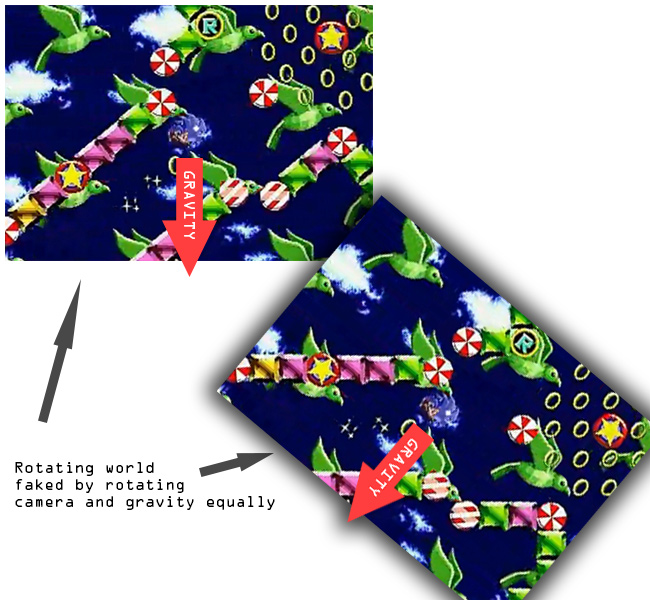
Once I realised this fact it made my life a whole lot easier. Calculating the physics for the world should now just be a matter of solving a circle against a static grid without rotations. I decided to go with my own physics solution rather one of the existing solutions such as Box2D or Nape as I thought that it should be pretty simple to calculate and I knew from a previous project that using Box2D or Nape would have issues at the joins between tiles.
The solution it turns out took a little longer than I thought but I eventually cracked it. The key was to use the Separating Axis Theorem with Voroni Regions, there is a great tutorial on it over at magnet software, they have a handy SWF that demonstrates the concept really well:
As can be seen from above that all you need do is split the problem up into a grid, then in turn check each of the 8 neighbouring cells from the current cell. The north, east, south and west cells can be classed as one type and only need to have their relevant axis checked against the radius of the player wheres the corner cells need to be checked against the distance from the closest point. In code this looks something like:
[codesyntax lang="actionscript3"]
// From Player.hx

override public function update(delta:Int) : Void
{
	#if !mobile
	if (Ctrl.instance.isDown("up")) vel.y -= 1;
	if (Ctrl.instance.isDown("left")) vel.x -= 1;
	if (Ctrl.instance.isDown("right")) vel.x += 1;
	//if (Ctrl.instance.isDown("down")) vel.y += 1;
	#end

	if (Ctrl.instance.mouseDown) vel.y -= 1;

	var d = delta * 0.01;
	vel.x += gravity.x * d;
	vel.y += gravity.y * d;

	var newPos = new Vec2(x + vel.x * d, y + vel.y * d);
	var ntx : Int = Std.int(newPos.x / Game.GRID_SIZE);
	var nty : Int = Std.int(newPos.y / Game.GRID_SIZE);

	checkTileCollide(ntx, nty, ntx - 1, nty + 1, newPos, vel);
	checkTileCollide(ntx, nty, ntx + 1, nty + 1, newPos, vel);
	checkTileCollide(ntx, nty, ntx - 1, nty - 1, newPos, vel);
	checkTileCollide(ntx, nty, ntx + 1, nty - 1, newPos, vel);
	checkTileCollide(ntx, nty, ntx, nty + 1, newPos, vel);
	checkTileCollide(ntx, nty, ntx, nty - 1, newPos, vel);
	checkTileCollide(ntx, nty, ntx + 1, nty , newPos, vel);
	checkTileCollide(ntx, nty, ntx - 1, nty , newPos, vel);

	x = newPos.x;
	y = newPos.y;
}

private function checkTileCollide(fromTX:Int, fromTY:Int, toTX:Int, toTY:Int, pos:Vec2, vel:Vec2) : Bool
{
	var tile = game.level.getTile(toTX, toTY);
	var dTX = fromTX - toTX;
	var dTY = fromTY - toTY;
	if (tile != null && tile.is(SolidBlock))
	{
		if (dTX == 0)
		{
			var d =  Math.abs(pos.y-((toTY - fromTY) > 0?toTY * Game.GRID_SIZE:fromTY * Game.GRID_SIZE));
			if (d < radius)
			{
				pos.y += dTY * (radius - d);
				vel.y = 0;
				return true;
			}
		}
		if (dTY == 0)
		{
			var d =  Math.abs(pos.x-((toTX - fromTX) > 0?toTX * Game.GRID_SIZE:fromTX * Game.GRID_SIZE));
			if (d < radius)
			{
				pos.x += dTX * (radius - d);
				vel.x = 0;
				return true;
			}
		}
		else
		{
			var tp = new Vec2((dTX>0?fromTX:toTX)*Game.GRID_SIZE, (dTY>0?fromTY:toTY)*Game.GRID_SIZE);
			var vToCorner = new Vec2(tp.x - pos.x, tp.y - pos.y);
			if (vToCorner.lengthSqr() < radius * radius)
			{
				var ang = Math.atan2(vToCorner.y, vToCorner.x);
				pos.x = tp.x - Math.cos(ang) * radius;
				pos.y = tp.y - Math.sin(ang) * radius;
				//vel.x = vel.y = 0;
				return true;
			}
		}
	}
	return false;
}
[/codesyntax]
Its not 100% perfect, there is some oddness when the player hits a corner but will do for now.
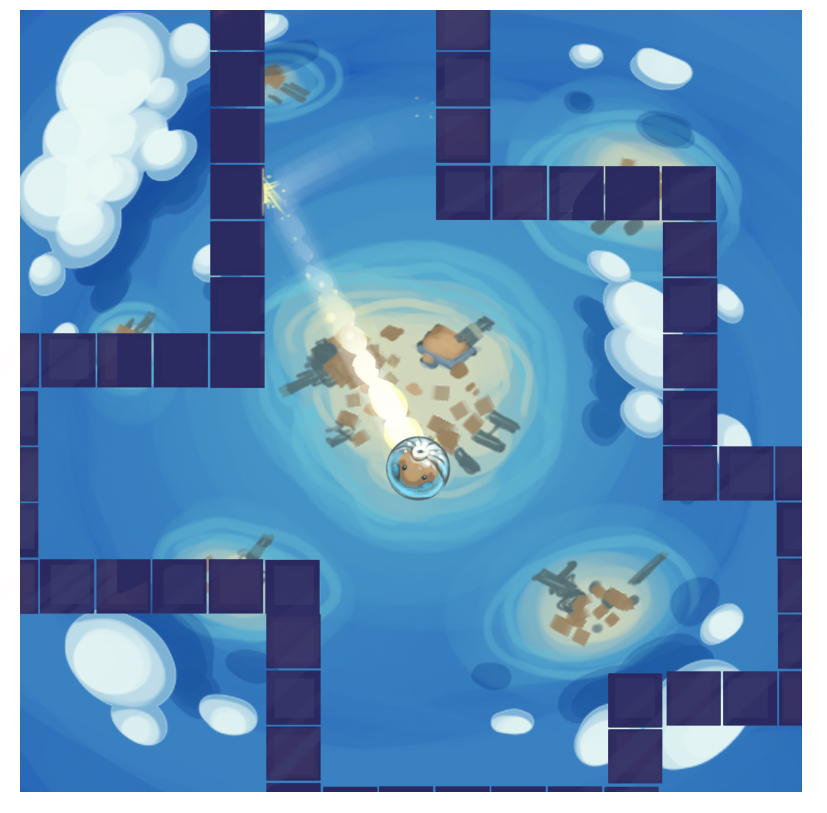
On the art side of the project Moh has been making good progress coming up with themes for the game. We have been playing around with the idea that the player is a Hamster lost in space, which I really like the idea of. To test this idea he made little mock-up, which looks great:
You may have noticed that currently the game is in Flash. That's because with NME you can target Flash as one of your outputs. This makes developing and testing the game alot easyier (a lot faster to compile and run). I have however been very aware of the problems I could cause myself if I developed the whole game solely in flash and only testing on mobile right at the end. Trying to track down an obscure problem in a fully written game would be a nightmare. So I have been making progress with getting the game to run on my iPhone 4.
One of the problems I faced (and I banged my against the wall for a while on this one) was that for some reason when the level was populating from the PNG, certain tiles weren't being built. I couldn't for the life of me work out why. To cut a long story short, apparently when building for iOS in Haxe you MUST put the super call in the constructor BEFORE any other call, else the code before the super call in the constructor wont be executed:
[codesyntax lang="actionscript3"]
class Player extends BaseObject
{

	public function new()
	{
		trace("This will not be executed when built for iOS but WILL be executed when built for flash");
		super();
		trace("This will be execute on flash AND iOS");
	}

...
[/codesyntax]
A small thing to remember but quite a gotcha for the NME Haxe newbie!
Another issue I have run into is the fact that my iPhone currently has iOS 5.1 on it, this means that to use it as a testing platform I had to upgrade my Macbook to OSX Lion which meant I have to leave it running over night and this morning downloading and installing. Not a biggie as I have been meaning to upgrade for a while anyways, but an inconvenience when you want to sit down to test your shiny new game out!
We have quite a way to go, but im happy with the progress we have made in 3 days thus far :)
